🚨Disclaimer: The goal of this article is not to encourage unauthorized unlocking, nor to provide step-by-step bypass instructions. Instead, this guide aims to help you understand what FRPFile/FirmwareBD actually is, what it offers, its limitations, and safer alternatives if you legitimately own a locked device.
FRP is a security feature built into modern Android devices to prevent unauthorized access after a reset. Many users search for solutions like "FRPFile FirmwareBD" (a website known for offering firmware packages, FRP files, and flashing tools that may help restore access to an Android device) when they forget your Google account password or buy a second-hand device that wasn't properly reset.
By the end, you'll have a clear picture of how the site works, whether it's reliable, and what options you can consider if you're facing an FRP lock on your Android phone.
What Is FRPFile/FirmwareBD.com?
FRPFile/FirmwareBD is a third-party website that provides downloadable Android resources such as stock firmware, FRP bypass files, combination files, USB drivers, and flashing tools. It serves as an unofficial repository where users—mostly technicians and advanced Android users—can find files needed for device repair, system restoration, or Google FRP troubleshooting.
The platform is not affiliated with Google, Samsung, Xiaomi, Oppo, Vivo, or any other smartphone manufacturer, nor is it certified or endorsed by any official company.
Instead, it functions as a community-driven file archive, collecting and sharing firmware-related packages from various sources. Because of this, the site is primarily used by people who need quick access to older firmware versions, rare combination files, or FRP-specific packages that are no longer available from official channels.
✍️ In short, FRPFile/FirmwareBD is best described as an unofficial Android repair resource hub, offering convenience but requiring careful, responsible use—especially when dealing with sensitive operations like FRP bypass or firmware flashing.
What Can You Download from FRPFile/FirmwareBD?
FRPFile / FirmwareBD offers a variety of Android-related files that users often seek for device repair, FRP bypass, or system restoration.
🗂️Common categories include:
- ⛄Stock ROM / Firmware: Official or custom firmware files for specific device models, used to restore the system or recover from soft-bricks.
- ⛄FRP Bypass Files: Files specifically designed to help bypass Google account verification on Android devices (such as Samsung, Motorola, LG, Pixel, HUAWEI, Xiaomi.). Note that their effectiveness depends on the Android version and device model.
- ⛄Samsung Combination Files: Special firmware packages used to enable developer/debugging mode, often required for flashing or FRP unlocking on Samsung devices.
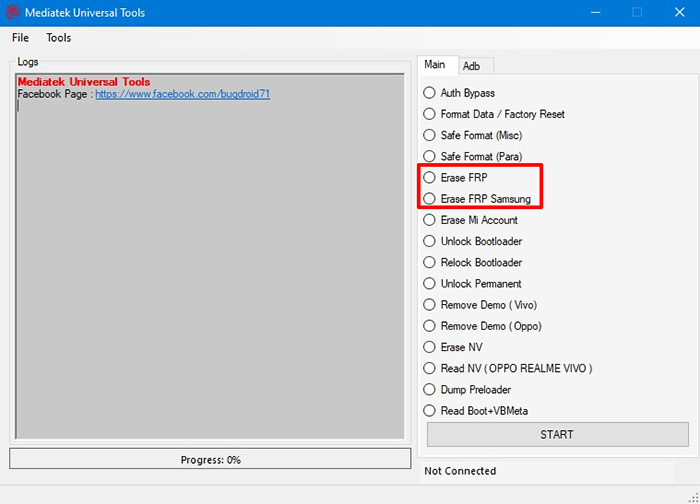
- ⛄MTK / Qualcomm Flashing Tools: Utilities for flashing firmware onto devices with MediaTek or Qualcomm chipsets. These tools are generally used by technicians.
- ⛄USB Drivers: Drivers that ensure the device is properly detected on a PC for flashing, ADB, or fastboot operations.
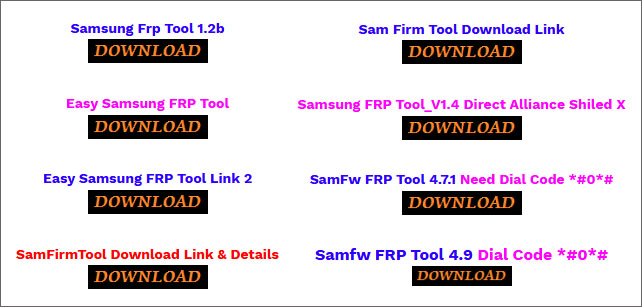
Direct Download: SAMSUNG FRP BYPASS TOOL from Firmwarebd
![download samsung frp bypass tool from firmwarebd]()
Using these tools incorrectly can result in permanent damage, data loss, or security vulnerabilities. Always verify file compatibility and consider safer alternatives whenever possible.
⬇️How to Download tools from FrpFile/Firmwarebd Safely:
If you plan to download files from FRPFile or FirmwareBD, understand that these sites are not fully trustworthy and carry real risks. Here is the simplest way to minimize potential harm.
1. Only Download from Verified or Reputable Mirrors
Only download from the site’s primary links. Skip any random mirrors or re-uploaded files shared on forums. Treat every .exe as untrusted unless absolutely necessary.
2. Scan the File Before Opening and Use a Sandbox/VM
Use multiple antivirus engines or an online scanner to check the ZIP/RAR or tool before extracting it. Never run tools directly on your main system. Run any Windows-based FRP tool inside a virtual machine (VMware/VirtualBox) or sandbox environment to prevent malware from impacting your real computer.
3. Confirm Compatibility Before Flashing
Make sure the firmware matches your device exactly—model number, CSC, chipset, Android version. A mismatch can brick your phone. If anything does not match perfectly, do not proceed.
4. Back Up Important Data First
Always back up personal data and critical partitions (EFS/IMEI). Flashing the wrong file can wipe critical data. Losing IMEI or NV data can permanently break network connectivity. If something goes wrong, recovery may be impossible without them.
How to Use FrpFile/Firmwarebd for FRP Bypass
Bypassing FRP or flashing firmware is not a simple user operation. You should be aware of:
- bootloops
- stuck download mode
- failed Odin/flashing logs
- locked or corrupted bootloader
- lost IMEI/baseband
- FRP re-locking after reboot
- irreversible hard-bricks on newer Android versions
If anything goes wrong, recovery may require specialized tools, paid services, or professional repair shops.
Prerequisites
- ✅ Supported Devices: Samsung, Motorola, Xiaomi, Huawei, Vivo, OPPO, Qualcomm, etc.
- ✅ Supported Android: Android 10-14
*Note: FirmwareBD.com does not offer a centralized, officially maintained "Supported Models List". Its resources are released in the form of "single blog + single model". Therefore, to check if your Android device is supported, just search your Android model in this website.*
Here's how to bypass FRP when you forgot the Google account password after factory reset on your Android phone or tablet:
Step 1. Preparation and Safety
Enable antivirus on your Windows PC, prepare a USB cable, and ensure phone drivers are installed. Then open a browser and navigate to the official FRPfile/FirmwareBD webpage.
Step 2. Search and Download FRP Tools
On the FRPfile/FirmwareBD page, scroll down and look for the firmware that you want to download. If this page doesn't include the firmware or tool you want, use the search bar to enter your phone brand, model, chipset (e.g., MTK/Qualcomm), or Android version to find matching FRP files or bypass tools.
Select the latest compatible file, download from trusted hosts like MediaFire, scan with antivirus, and extract the package.
Step 3. Run the FRP Bypass Tool
Extract the download, install any required drivers or tools (e.g., ADB/Fastboot), and boot your phone into the specified mode (e.g., Download or Fastboot).
Connect via USB, launch the tool, select your device options, and follow on-screen prompts to execute the bypass; the phone restarts without the FRP lock upon completion.
✍️Note:
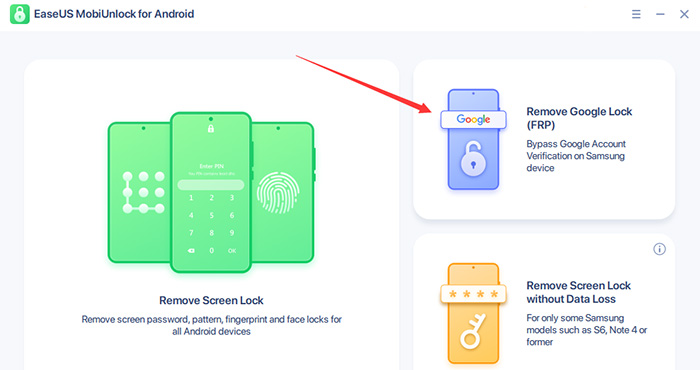
Do not expect success on modern devices. Even with the correct file, success is not guaranteed. Many FRP methods shared in older files no longer work on newer Android versions. If you are not fully confident in Android FRP bypass, it is strongly recommended to use a legitimate, guided FRP unlocking solution instead, such as EaseUS MobiUnlock for Android (available for Samsung FRP removal).
Is FRPFile/FirmwareBD Safe and Legal for FRP Bypass?
Although FRPFile / FirmwareBD provides a large collection of firmware packages, FRP files, and flashing tools, downloading and using files from an unofficial source carries several important risks.
1️⃣ Third-Party Security Ratings Show Low Trust Scores
Several independent website safety scanners categorize firmwarebd.com as a high-risk or suspicious site due to factors such as:
- No verified company information
- Unclear file origins
- Lack of HTTPS security in older snapshots
- Downloadable executable files with unknown integrity
- Limited transparency about file sources or maintainers
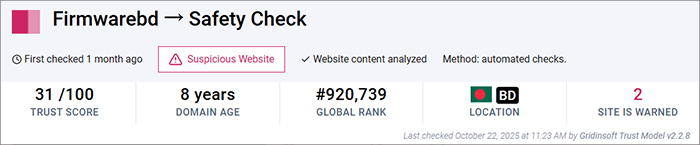
According to Gridinsoft's Website Reputation Checker, firmwarebd.com is classified as a "Suspicious Website" and currently carries a low trust score of 31/100.
![firmwarebd review by gridinsoft]()
The analysis warns of "multiple red flags that compromise its trustworthiness and user safety," citing "misleading information, questionable operational practices, or potential malware distribution" as major concerns.
"Firmwarebd.com operates as a suspicious website...The website may host malicious software, engage in deceptive practices, or collect personal data without proper safeguards."
—from Gridinsoft.com
2️⃣ Technical Risks: Malware, Corrupted Files, and Device Damage
Because FRPFile / FirmwareBD is not an official Android firmware provider, the files you download may have hidden risks:
- Malware-infected ZIPs or modified system files
- Tampered or incomplete firmware packages
- Corrupted combination files that fail during flashing
- Version-mismatched firmware that can soft-brick or hard-brick your phone
- IMEI or baseband errors after flashing incorrect files
- Loss of network connectivity, Wi-Fi, or security features
- Data loss if flashing wipes partitions unexpectedly
These issues typically do not occur when using official manufacturer firmware, but they are significantly more common with third-party downloads.
For a more effective FRP bypass solution, scroll down to the next part — A Safer Alternative for FRP Bypass.
A Safer Alternative for FRP Bypass — One-Click Solution
Given the security risks, malware concerns, and compatibility issues associated with FRPFile / FirmwareBD, most regular users should avoid flashing unknown firmware files. If you legitimately own the device and want a safer, guided FRP bypass solution, EaseUS MobiUnlock for Android offers a reliable alternative—especially for Samsung FRP situations.
What Is EaseUS MobiUnlock for Android?
EaseUS MobiUnlock is an official Android unlocking tool designed to help users regain access to their devices in a safer, more structured way. Unlike manual FRP files, which may be outdated or risky, MobiUnlock provides a guided FRP removal process backed by a professional development team and active updates.
![use EaseUS MobiUnlock for Android to unlock FRP on Samsung]()
It is particularly effective for Samsung Google Account (FRP) locks, which are notoriously difficult to bypass on newer Android versions.
Key Features for Samsung FRP Bypass
- ✅Compatible with a wide range of Samsung models — Supports both older and new generations of Samsung phones and tablets.
- ✅Updated FRP unlocking methods — The tool is frequently updated to adapt to new Android patches, giving it a higher success rate than outdated FRP files.
- ✅No need to flash firmware manually — You avoid the risk of mismatched ROMs, corrupted combination files, and device bricking.
- ✅Automatic detection & guided steps — The software automatically identifies your device model and walks you through the required actions with on-screen instructions.
- ✅Higher reliability and lower risk — Because it does not rely on third-party firmware packages, the risk of malware and hardware damage is significantly reduced.
| Feature |
EaseUS MobiUnlock✅ |
FrpFile/FirmwareBD |
| Safety |
Official software, digitally signed |
Unverified files, malware risk |
| Difficulty |
Beginner-friendly |
High—requires flashing tools and technical skills |
| Supported Device |
Mainly Samsung |
Various FRP tools for Android brands |
| Success rate |
100% |
Inconsistent, often outdated |
✍️Designed for Legitimate and Authorized Use Only
EaseUS MobiUnlock must only be used in situations where you are legally allowed to unlock the device, such as:
- You own the Samsung device but forgot the Google account password
- You purchased a second-hand device that was not properly reset
- You are repairing devices with the owner's explicit consent
- A family member asked you to help unlock their device
It is not intended for unauthorized access, bypassing security on stolen devices, or removing accounts that do not belong to you.
FAQ
1. Can I legally bypass FRP using files from FirmwareBD?
You may only bypass FRP if you legitimately own the device or have explicit permission from the owner. Bypassing FRP on someone else’s device is illegal and violates Google’s security policies.
2. Do FRP files from FirmwareBD work on Android 12–14?
Success is inconsistent. Many FRP packages found on the site were created for older Android versions and no longer work on modern Samsung models due to increased security patches.
3. What is the main risk of downloading FRP files?
Risks include:
- Malware hidden in ZIP/RAR or executable files
- Corrupted or mismatched firmware leading to soft/hard bricks
- IMEI corruption or loss of network connectivity
- No support if something goes wrong
4. What is a safer alternative to FRPFile / FirmwareBD?
For Samsung devices, EaseUS MobiUnlock for Android is a safer and more reliable option. It provides user-friendly interface and guided FRP removal without requiring manual firmware flashing.
Final Thoughts
FRPFile / FirmwareBD may seem like a convenient source for FRP files, firmware packages, and combination files, but the risks are significant. With low trust ratings, unverified downloads, outdated FRP methods, and the potential for malware or device damage, it is not a safe option for most users—especially those without technical flashing experience.
If you legitimately own the locked device and need to regain access, a professional tool like EaseUS MobiUnlock for Android provides a far safer, more reliable, and continuously updated solution for Samsung FRP scenarios. It eliminates the need for manual flashing, reduces the chances of bricking your phone, and ensures you stay within legal boundaries.
Ultimately, FRP protection exists to safeguard user data, and any unlocking method should be used responsibly, ethically, and only for devices you own or are authorized to repair.








 NEW
NEW HOT
HOT
