🚨Disclaimer: This article is intended for informational and educational purposes only. UnlockTool and EaseUS MobiUnlock should be used legally and responsibly, respecting all applicable laws and regulations regarding device unlocking and bypass.
✍️ Full Review of UnlockTool:
💠Availability & Compatibility: UnlockTool is a Windows PC software that works on Android phones and tablets, primarily for FRP bypass, flashing, and bootloader unlocking.
💠UnlockTool full versions overview: https://unlocktool.net/download/
💠Free download UnlockTool latest version: https://file.unlocktool.net
💠Get UnlockTool Free License: Keep an eye on official social media for occasional discounts and giveaways, watch for exclusive promo codes from trusted tech creators, but avoid using free license generators or cracks due to security risks.
💠UnlockTool Alternative: Mainly for Samsung FRP bypass, EaseUS MobiUnlock for Android is the best alternative to UnlockTool.
What Is UnlockTool?
UnlockTool, typically available at unlocktool.net, is a Windows PC FRP bypass tool aimed primarily at mobile repair technicians. Its main features include:
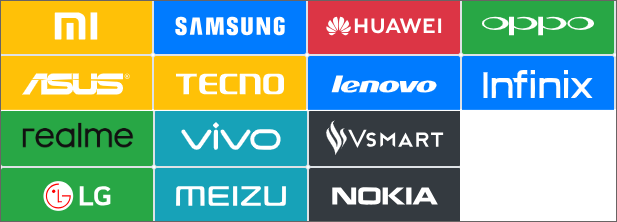
- Device Support: Compatible with a wide range of Android devices such as Samsung, Motorola, Xiaomi, HUAWEI, OPPO, Realme, Vivo, LG, Nokia, etc., and various chipsets like MTK and Qualcomm.
- Functionality: Can remove FRP (Factory Reset Protection), unlock bootloaders, perform flashing/firmware operations, clear device locks, and restore network/EFS data.
- Distribution: The software is distributed via its website and requires registration or purchase of a license to activate.
- Purchase: The website provides "software download + license activation," requiring users to register or purchase a license.
![unlocktool compatible devices]()
Although popular in the Android/Motorola FRP bypass area, some users report low reliability and poor support of UnlockTool. For example, a Reddit user commented as below:
"I just wanna share my experience with unlocktool software so far… I purchase there tool to unlock my Xiaomi … but sadly the unlock tool didn't work, they don't offer any support or anything."
— from Reddit
Does UnlockTool Have an APK or iOS Version?
UnlockTool does not have a dedicated APK or iOS app version. UnlockTool only released a Windows version. It is a desktop/laptop application compatible with Windows 10 and above, designed to connect to Android devices.
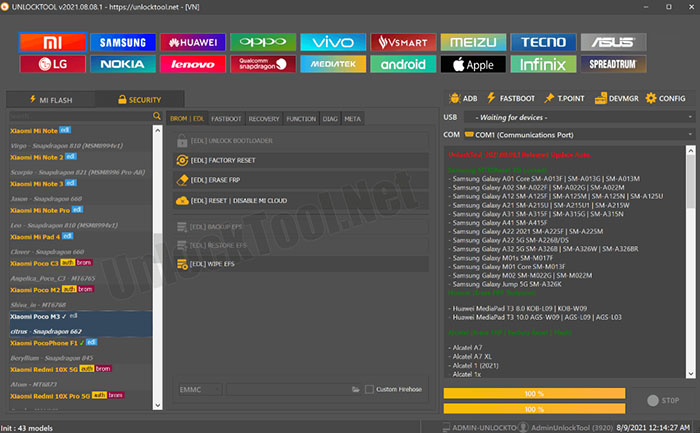
![unlocktool interface screenshot]()
unlocktool.net never claimed that it has an official iOS version or APK tool for Android. There exist APKs with similar names, e.g., "Toko UnlockTool" on Google Play, but it may not be official UnlockTool product.
Does UnlockTool Work Well with iPhones/iPads?
In addition to Android, UnlockTool also supports some iOS device operations. It provides basic support for iPhones and iPads, including features like disabling Find My iPhone (FMI) and bypassing iCloud Activation Lock on a limited set of models and iOS versions up to around iOS 17.5.1.
And we also found some YouTube videos claim iOS functionality and demonstrate how to bypass iPad Mini 2 using UnlockTool step by step. (https://www.youtube.com/watch?v=_8QsPA8JGdY).
Therefore, its functionality on iOS devices is more restricted compared to Android, and it mainly targets older or specific device models. Some advanced iOS unlock operations require additional tools or jailbreaking methods not covered fully by UnlockTool.
Overall, while UnlockTool can assist with certain iOS unlocking tasks, it is primarily designed and optimized for Android devices.
How to Free Download UnlockTool
💠UnlockTool full versions overview: https://unlocktool.net/download/
💠Free download UnlockTool latest version: https://file.unlocktool.net (Updated on Nov. 15, 2025)
Note: Official website availability may be unstable; sometimes it shows "Internal Error" or is blocked.
Meanwhile, some tech forums like Microsoft warn it might contain malware or be a scam. For instance, a Microsoft forum user asked:
"Is UnlockerTool.exe a Virus of some sort? … WARNING! This link will lead to a download page of an app which could be malicious! Click at your own risk!"
Stay alert and cautious and be aware of virus or any bundled software when you download any zip file from Internet to your computer.
How to Get an UnlockTool Free License
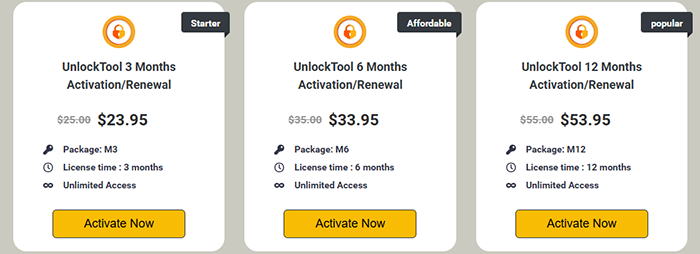
UnlockTool is widely recognized as a paid professional tool for unlocking, flashing, and repairing mobile devices, with licenses sold through its official website and authorized resellers. As of now, UnlockTool does not officially offer a free license or a trial version through its main website. All standard activations require users to purchase a valid license for three, six, or twelve months.
![unlocktool pricing options]()
Occasionally, some third-party platforms or resellers may claim to host giveaways or provide promotional codes for discounted licenses. Most of these events are community-driven on platforms like Facebook, YouTube, or specialized repair forums—not official promotions from UnlockTool itself.
Here are the main legitimate ways you might get a free or discounted UnlockTool license.
- ❇️ Watch for official discounts during holidays or special events on the UnlockTool Facebook page and other social platforms. Limited-time offers and coupons appear here occasionally, but they're not always active.
- ❇️ Some YouTube tech creators or authorized resellers will share exclusive promo codes, which can sometimes save a few dollars on your subscription.
- ❇️ Rare community campaigns, such as Facebook page giveaways or forum sweepstakes, may offer free licenses.
- ❇️ Try to avoid downloading free license generators or using UnlockTool crack, as these carry a high risk of malware.
These tips can maximize the chance of paying less (or nothing) for UnlockTool, while minimizing the risk of falling for scams. Only trust offers from official outlets or recognized partners. Avoid UnlockTool cracked versions or free licenses from unknown sources, as these may compromise your device's security or violate UnlockTool's terms.
How to Use UnlockTool
Once you purchase a license from the official website and download UnlockTool latest version, follow the steps below:
Step 1. Open UnlockTool and sign in using your registered username and password. Internet access is required, as UnlockTool is a login-based service.
Step 2. Connect the Android or iPhone device you wish to unlock or repair to your PC via USB. Ensure the necessary USB drivers are installed for your device.
Step 3. Choose the type of operation you want to perform (e.g., FRP bypass, unlock, firmware flash) and select the device brand/model from the supported list.
Step 4. Follow the prompts—such as entering the device into specific modes or confirming actions.
Step 5. Wait for the software to process the operation. Once finished, you'll receive a completion message.
For a detailed video tutorial, see its offcial YouTube channel: https://www.youtube.com/@UnlockTool-Official/videos
Best UnlockTool Alternative for FRP Bypass (Mainly Samsung)
If you are looking for an alternative to UnlockTool, EaseUS MobiUnlock is a strong choice for Samsung FRP bypass—especially for users who need a fast, user-friendly FRP bypass solution. MobiUnlock specializes in removing Google FRP lock from Samsung phones and tablets (Android 6–16), offering a true one-click process.
The software is designed for both beginners and advanced users, ensuring a hassle-free experience without technical steps. Its modern interface, 24/7 support, and reliable unlock rate make it particularly appealing for situations where you are locked out of your device due to a forgotten Google account.
MobiUnlock vs. UnlockTool
| Feature |
MobiUnlock |
UnlockTool |
| FRP Bypass Support |
Samsung phone and tablet |
Samsung, Xiaomi, Vivo, Oppo, etc. |
| Platform |
Windows & Mac |
Windows only |
| User Interface |
Modern, beginner-friendly |
Technician-oriented UI |
| Free Trial |
Yes (limited) |
No |
| Pricing |
$39.95/yr; $59.95/lifetime |
$35/6mo; $55/yr |
| Support & Guides |
24/7 support, 30-day refundable |
Community, basic guides |
EaseUS MobiUnlock stands out with its one-click FRP bypass process for Samsung devices, high success rate, and customer-centric design. It's ideal for individual users and resellers who want a smooth and reliable unlock experience without learning complex repair workflows or troubleshooting compatibility on less common brands.
If Samsung FRP bypass is your main requirement and you value ease of use, MobiUnlock is the best alternative to UnlockTool.







 NEW
NEW HOT
HOT
