🚨Disclaimer:
This article is for educational and informational purposes only. SamFlash Tool is often used for advanced Android maintenance, including FRP bypass and firmware flashing. We do not encourage or support any illegal or unauthorized use of this tool. Please make sure you only operate on devices you own or have permission to manage.
What Is SamFlash Tool
SamFlash is a powerful, free tool for Samsung firmware work and FRP removal. It is designed to interact with Samsung phones to update or reinstall the device's software, remove FRP locks, or fix system-related issues. It runs on PC (Windows) — it is not an Android APK and there's no widely recognized Mac native build.
SamFlash's headline feature is automated flows to remove or bypass Factory Reset Protection so a device can be set up without the original Google account credential. This is the core reason many users seek the tool.
Which phones and Android versions it claims to support?
- Primary focus: Samsung devices. Most documentation, tutorials, and user reports describe SamFlash as designed for Samsung phones/tablets (Galaxy S/Note/A/M lines and many others).
- Android version range: It supports for many devices running Android 11–14 (and specifically compatibility with Android 12/13/14 in newer releases), but real-world success depends heavily on device model, bootloader/patch level, and Samsung's ongoing security updates.
Use the tool only for legitimate, authorized cases and take strict precautions (backups, verified download sources, and up-to-date antivirus) if you proceed.
Free Download SamFlash the Latest Version (v4.1/v4.2)
There is no known official website for "SamFlash" — it is typically circulated through third-party forums, unlock sites, and file-sharing pages rather than an authoritative developer portal. That lack of an official source increases the risk of tampered installers or bundled malware, so be extremely cautious.
So far, the latest version of SamFlash tool is v4.2, while most third-party resources are offerring v4.1 package files. The SamFlash zip file is commonly shared on tech blogs, unlock sites, and tutorial videos where users download the installer and run procedures to access or repair Samsung devices.
Most distributions of SamFlash are offered free of charge (free downloads and no upfront license fee), though the software is distributed via unofficial channels rather than an official site. That means while the tool itself is usually available without payment, you should be cautious about where you download it.
How to Use SamFlash Step by Step
The following step-by-step process makes SamFlash Tool a user-friendly and effective solution for removing FRP locks on Samsung devices, particularly useful for technicians and users locked out after a factory reset.
Before using SamFlash Tool, make sure you:
- Use it only on your own device or with proper authorization.
- Back up your data to avoid unexpected data loss.
- Download the tool from a trusted source and scan for viruses.
- Check your device model and Android version for compatibility.
- Remember: using FRP bypass tools improperly may be illegal or risky.
Step 1. Install Samsung USB Drivers
Before using SamFlash Tool, ensure the necessary USB drivers for your Samsung device are installed on your Windows PC. This helps the tool recognize your device properly.
Step 2. Run SamFlash Tool as Administrator
Launch the SamFlashTool.exe application and right-click it to run it as a Administrator.
Step 3. Connect Your Samsung Device
Using a reliable USB cable, connect your Samsung phone to the PC. Open the SamFlash Tool and wait for it to automatically detect your connected Samsung phone.
Step 4. Select "Remove FRP" Option
Once the device is detected, choose the "Remove FRP" option within the tool. Carefully follow the instructions displayed on the screen, which may vary depending on your device's Android version and model. The tool will guide you through steps to successfully bypass the FRP lock.
Step 5. Complete the Process and Restart
After the FRP bypass process finishes, you will see a confirmation. Disconnect your device, then restart it. You can now set up your Samsung phone without the Google account lock.
4 Common Errors When Using SamFlash Tool
While SamFlash Tool offers powerful functions like firmware flashing and FRP bypass, many users have reported encountering various errors during use, especially the updated failed error message and invalid Odin CMD. Let's see it all now!
1. SamFlash Update Failed
Users frequently encounter an "update failed" error when trying to launch or update the SamFlash software. This is often due to network connection problems or the tool being blocked by antivirus software or Windows Defender. Solutions include switching networks, disabling antivirus temporarily, running the tool as administrator, or re-extracting the tool files.
2. Invalid Odin CMD SamFlash
The "Invalid Odin CMD" error occurs when SamFlash sends a command to a Samsung device via the Odin protocol (used in Download Mode) that the device cannot recognize or accept. Common causes include:
- The command or firmware is incompatible with the device model or bootloader version.
- The file being flashed is in the wrong format or corrupted.
- USB drivers, cables, or ports are unstable, causing incomplete communication.
- The SamFlash tool version or implementation doesn't match the device's current security protocols.
- The device's security updates or antivirus software block certain commands.
3. Stuck on 'waiting for device'
The tool sometimes gets stuck on "waiting for device" after starting the FRP removal process. This can occur due to improper USB connections, incorrect device mode, or driver issues. Recommendations include using original USB cables, enabling USB debugging and OEM unlocking, trying different USB ports, reinstalling Samsung drivers, and restarting both PC and phone.
4. SamFlash ADB Enable Fail
The "ADB Enable Fail" error occurs when SamFlash cannot successfully enable Android Debug Bridge (ADB) on the connected Samsung device. ADB is required for device detection. Common reasons include:
- USB debugging not enabled on the device before connection.
- Device authorization issues, such as the device refusing the PC's ADB key.
- Driver or connection problems, including faulty cables, unstable ports, or missing OEM drivers.
- Security or Android version restrictions, where newer devices or security patches prevent third-party tools from enabling ADB.
Safer Alternative to SamFlash: EaseUS MobiUnlock for Android
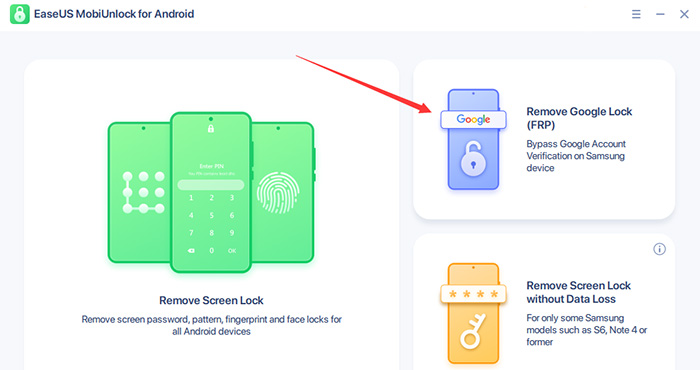
If you want a more reliable, supported, and safer way to handle FRP and lock‑screen problems than unofficial tools, EaseUS MobiUnlock for Android is a great option designed for legitimate device owners and technicians.
![use EaseUS MobiUnlock for Android to unlock FRP on Samsung]()
With this Samsung FRP bypass tool, you are able to achieve the following:
❇️ Supports Samsung, including latest Galaxy models (e.g., S‑series): EaseUS advertises broad Samsung compatibility and regularly updates its device list and guides to cover current Galaxy phones. While individual model support can vary by firmware/patch level, EaseUS positions MobiUnlock as compatible with mainstream Samsung models. For authoritative confirmation on any single model (for example, Galaxy S25), check the product support page or tester in the app before purchase.
❇️ Covers modern Android versions (up to the latest Android 16): EaseUS documentation and product pages reference support for recent Android versions and include step guides for Android 12/13/14/15+ flows. Because Android/One UI updates continually change FRP behavior, EaseUS states it maintains updates to improve compatibility. (Always verify the specific Android version in the app’s device list.)
❇️ Simple operation — minimal technical skill required: MobiUnlock is built as a user‑friendly, wizard‑style tool: select the brand/model, follow on‑screen prompts, and the program handles most behind‑the‑scenes steps. EaseUS explicitly markets the product to non‑technical users as a one‑click or few‑clicks solution.
❇️ Brand assurance, safety, and trial availability: EaseUS is an established software vendor that offers official downloads, a free trial (to preview compatibility/steps), a 30‑day money‑back guarantee, and documented support channels — reducing the malware/virus risk common with unofficial tool distributions. Always download from the official EaseUS site and scan installers as an extra precaution.
FAQ
1. Is SamFlash safe?
SamFlash is an unofficial, third-party tool and safety varies by source and build. When you download from an unfamiliar website, be vigilant against possible bundled unwanted software, as well as the risks of running unsigned binaries from random sites.
2. Is there a version of SamFlash for Mac?
There is no widely recognized native macOS release of SamFlash. SamFlash is generally distributed as a Windows executable and most reports discuss running it on Windows PCs; some users attempt to run Windows builds on Mac via virtual machines or emulation, but that is a workaround rather than an official Mac version. If you require safe Mac-native FRP bypass tools, consider EaseUS MobiUnlock, which offers both Windows and Mac versions for FRP bypass.
3. How to download SamFlash the latest version?
Because SamFlash has no single official vendor site, distributions appear on various third-party pages and community mirrors; published version numbers in guides and videos include v4.1 and v4.2 in different places. For safety, do not blindly download from unknown sites.







 NEW
NEW HOT
HOT
