This article is intended strictly for educational and informational purposes regarding the EFRP.Me APK and general methods to bypass FRP on Android devices. Removing FRP should only be attempted on devices you own or have explicit authorization to access. We do not encourage or condone any illegal activity, nor can we be held responsible for any consequences arising from misuse, technical damage, or security risks caused by attempting to unlock devices unlawfully or by installing unofficial apps.
What Is EFRP.Me APK?
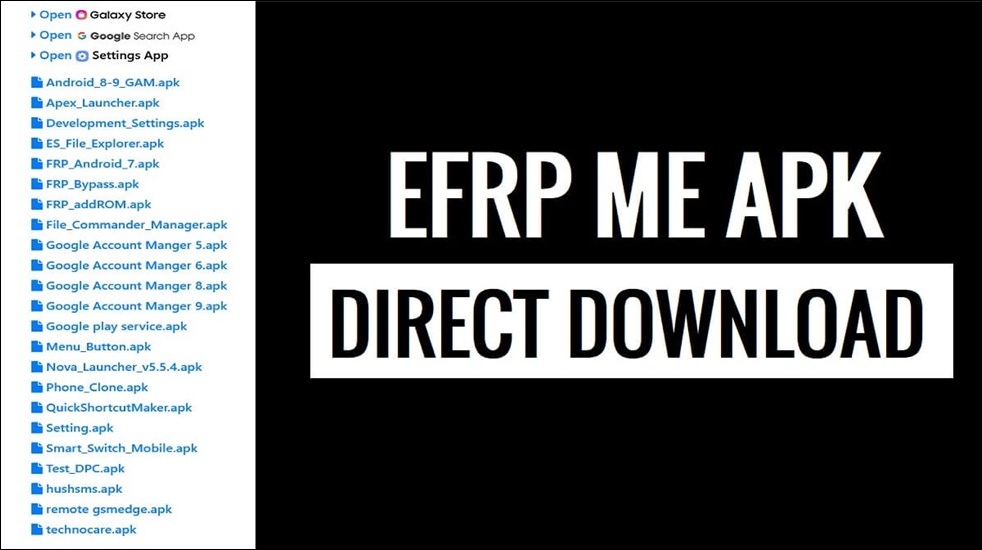
EFRP.Me APK is an Android application designed to bypass Google's FRP lock, a security feature that prevents unauthorized access to a device after a factory reset. This tool is especially helpful for users who have forgotten their login details or have obtained a second-hand phone that is still associated with a previous account.
Key Features of EFRP.Me APK
- FRP Lock Bypass: Allows users to unlock Android devices without needing the preceding Google account details.
- Wide Compatibility: Supports numerous Android brands covering Android versions 5.0 to 13.
- Shortcut Access: Provides direct shortcuts to critical settings, apps, and account menus, streamlining the FRP bypass process.
- No Root Required: Does not require rooting the device, which helps to mitigate risks of warranty voiding and system instability.
- Multiple APK Variants: There are different versions tailored for specific brands and Android OS levels for broader compatibility.
EFRP.Me APK offers a convenient, device-only solution for FRP bypass, but results may vary by device model and firmware; it may be less effective on newer phones with stronger security patches.
![efrp-me-apk.png]()
Must-Read Before Downloading EFRP.Me
Before downloading EFRP.Me APK, it's important to understand critical safety, cost, and version information to avoid risks and confusion.
Is EFRP.Me safe?
EFRP.Me APK is not officially supported by Google or major manufacturers. Its safety depends entirely on where you download it. Trusted APK or FRP bypass sites may reduce risks, but unofficial or cracked sources could contain malware or cause technical issues. And there are other safety risks you should consider:
- No official support: EFRP.Me does not offer official customer or technical support, so if anything goes wrong, you must rely on online guides and forums.
- Success varies: The tool's effectiveness depends on your device make, model, and Android OS version. It may not work on the latest phones or may cause bugs and crashes on some devices.
- User reviews: Some users report successful unlocking while others have experienced errors, installation issues, or unexpected app behavior.
Is EFRP.Me free?
EFRP.Me APK is completely free to download and use for its main FRP bypass feature on most Android devices. There is no charge for installation or basic functionality, and users do not need to pay for a subscription or premium access in typical use cases.
Always ensure you are downloading from trusted sources to avoid sites that may attempt to charge for the tool or provide compromised files.
EFRP.Me supported Android brands and versions
EFRP.Me APK supports a wide range of Android brands and versions in 2025, making it a versatile FRP bypass tool.
- Supported brands: Samsung, Huawei, Xiaomi, Oppo, Vivo, LG, Motorola, OnePlus, and Realme.
- Supported version: from Android 5.0 through to Android 13.
Is there an official site to download EFRP.Me?
There is no official standalone website exclusively dedicated to EFRP.Me APK download. Instead, the tool is primarily distributed and discussed through reputable third-party Android unlocking and FRP bypass sites such as bypassfrpfiles.com and Easy-Firmware.com. The following are some websites I collected online for downloading EFRP.Me APK for free.
- https://easy-firmware.com/efrp/ (Error: easy-firmware.com's server IP address could not be found.)
- https://bypassfrpfiles.com/2023/10/efrp-me-apk/
- https://frpbypass.romstage.com/easy-frp-bypass/
- http://apkpure.com/frp-bypass/com.rootjunky.frpbypass
Note: These sites display ads. Please be careful when you try to download firmware.
How to Download and Use EFRP.Me for FRP Removal
Here is a full guide on how to use EFRP.Me APK to bypass FRP on Android devices. First, let's get to know some tips and precautions:
- Only use the app on devices you own or have permission to unlock.
- Ensure your FRP-locked phone has at least 50% charge and is connected to a reliable internet to download the APK.
- Allow installation from unknown sources in your device settings and disable it after installation for device security.
- Having a backup file is essential to prevent data loss.
Step 1. Long-press the Volume Up and Volume Down buttons to activate TalkBack.
Step 2. Draw an L on the screen to open TalkBack settings. Then, turn TalkBack off and tap Help & Feedback > Get started with voice option.
Step 3. Play the YouTube video on the screen and select Share to open the YouTube web version.
Step 4. Go to My Profile > Settings > About > Terms of Service, which will open Google Chrome.
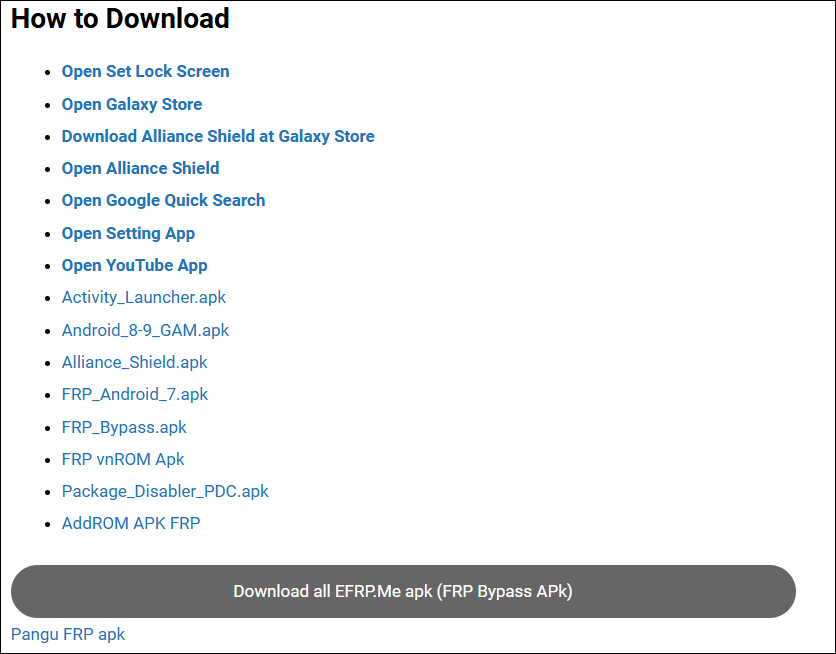
Step 5. Search for the website, such as bypassfrpfiles.com, to download EFRP.Me APK.
![efrp-me-apk-download.png]()
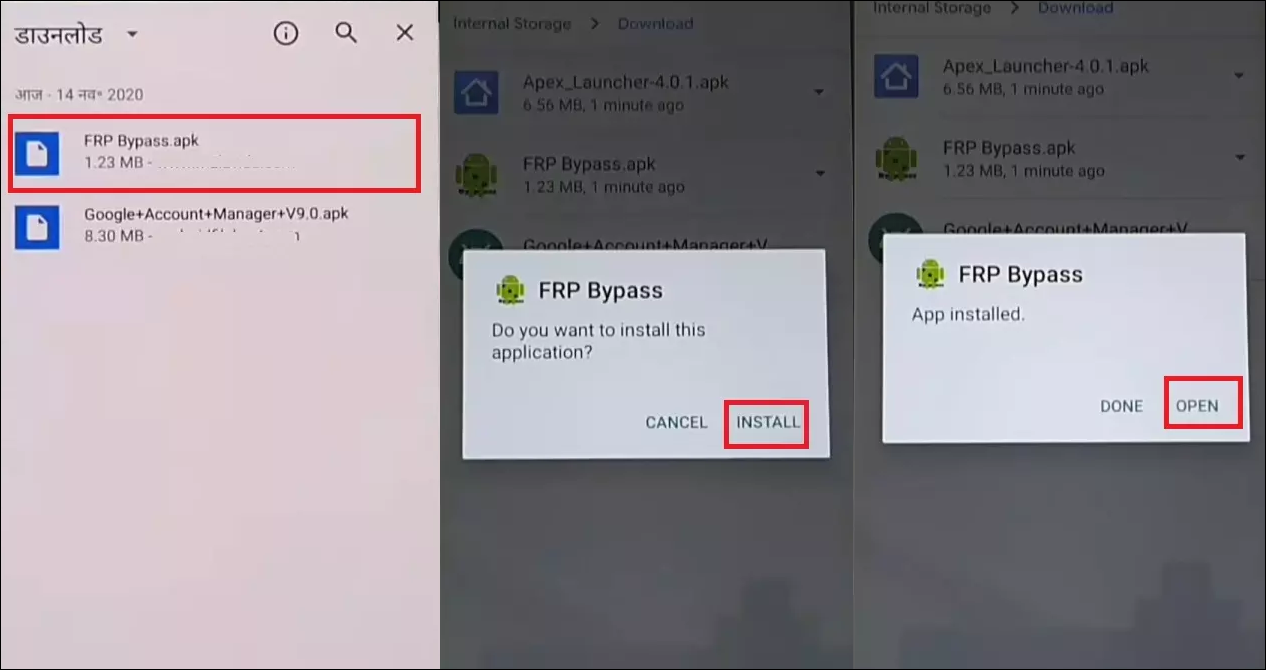
Step 6. When prompted, enable installation from unknown sources.
Step 7. After installation, launch the app from your app drawer.
![frp-bypass-apk-install.png]()
Step 8. Follow the instructions of the EFRP.Me APK and, if necessary, add a new Gmail associated with the device. You may also need to access certain device settings or a web browser to download additional files.
|
👍Pros
|
👎Cons
|
- Free and fast unlocking
- Works on many Android versions
- No PC required
- No Root required
|
- No official support
- Might fail on the latest firmware
- Potential security risks
- Warranty might be voided
|
EFRP.Me Alternative to Remove FRP Safely and Easily
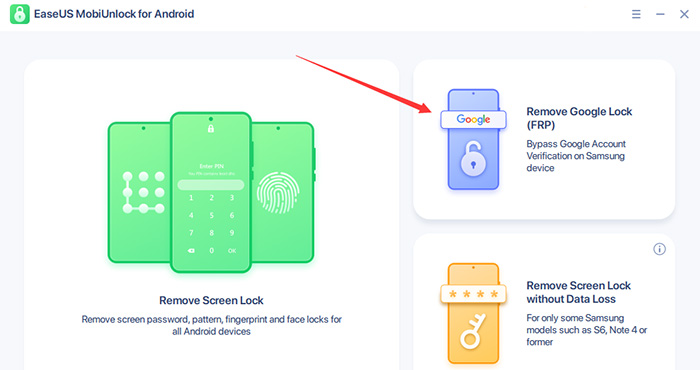
The above method relies on TalkBack tricks to open Chrome, thus giving you a chance to download an FRP bypassing APK from online websites. If TalkBack doesn't work right for you, consider an alternative designed for Samsung FRP removal, such as EaseUS MobiUnlock for Android.
EaseUS MobiUnlock for Android is a professional tool that bypasses Google's FRP lock on Samsung devices. It operates via a computer and achieves a high success rate in unlocking devices, even on the latest Android version. Moreover, the process does not require intricate manual tricks; just connect your locked phone to the computer, select your Android version, and the tool handles the rest.
![mobiunlock-frp-unlock-tool.jpg]()
Here is a clear comparison between EaseUS MobiUnlock for Android and EFRP.Me APK for FRP bypassing:
| Feature |
EaseUS MobiUnlock for Android |
EFRP.Me APK |
|
Price
|
Paid software
|
Free to use
|
|
Works on
|
Samsung (Android 6 - 16)
|
Samsung, Xiaomi, Huawei, LG, OnePlus, Oppo, Realme, Motorola, etc. (Android 5 - 13)
|
|
How It Works
|
Desktop-based tool; requires PC and USB connection
|
App installed directly on device; no PC required
|
|
User Experience
|
Guided interface, simple process, professional support
|
Manual steps; requires technical knowledge and TalkBack tricks
|
|
Success Rate
|
High, even with newer devices and security patches
|
May fail on devices with Android 14+ or new security patches
|
|
Bonus Features
|
Also removes screen locks (PIN, pattern, password, fingerprint, face)
|
Primarily focused on FRP bypass only
|
|
Risk Level
|
Very reliable, lower risk of malware and data loss
|
Higher risk if downloading APK from untrusted sources
|
|
Support & Updates
|
24/7 customer support, regular updates
|
No official support; updates depend on third-party sites
|
- EaseUS MobiUnlock for Android is ideal for users who want guided, safe, and supported FRP removal, especially on newer Samsung devices, via desktop software.
- EFRP.Me APK is suitable for experienced users comfortable with manual APK installation, device-side unlocking, and TalkBack tricks, but compatibility is limited to older Android versions and devices.
Choose EaseUS MobiUnlock for convenience, reliability, and support, or EFRP.Me APK for a free, device-only solution if your device is compatible and you understand the risks.
Conclusion
Removing FRP locks from Samsung and other Android devices remains a critical challenge for users who are locked out after a factory reset. Tools like EFRP.Me APK offers a free, device-only solution suitable for those who cannot access a computer. However, EFRP.Me carries increased risks if sourced from untrusted websites. Meanwhile, professional utilities such as EaseUS MobiUnlock for Android deliver a safer, guided user experience with high reliability and broader device compatibility, though a computer and paid license are required.
Choosing the right method depends on your technical comfort, device model, and Android version. Always prioritize trusted sources, data security, and the legality of FRP removal in your region to ensure your device remains secure and your personal information is protected.
FAQs
1. Is there official support for EFRP.Me APK?
No, EFRP.Me APK is a third-party app and does not come with official support. Users should rely on guides, forums, or reputable support sites for help.
2. What precautions should I take before using EFRP.Me APK?
Backup important data, only use trusted download sources, and make sure the device is yours or you have permission to unlock it.
3. What should I do if EFRP.Me APK crashes or freezes after launching?
This may be due to device incompatibility or firmware restrictions. Restart the phone, redownload the APK from a reliable source, or try a different version compatible with your Android system.
4. Does EFRP.Me APK cause data loss?
Certain bypass procedures may factory reset the device or wipe data. Always back up important information before attempting the process when possible.






 NEW
NEW HOT
HOT
