🚨Disclaimer: This article is for educational and informational purposes only. It explains what SamFirm and SamFirm AIO are and how they have been used. Bypassing security features (like FRP) or flashing firmware can void warranties, cause data loss, or break devices. Always get permission to work on a device that isn't yours and use official channels when possible.
Quick Answer
Free Download Samfirm AIO Tool (v1.4.3): Android File Host
Free Download SamFirm AIO Tool (v1.6.4): Samprotool.com
Guide: Put your device into Download Mode -> Connect Device to Computer -> select "Bypass FRP" option in Samfirm -> Wait for Completion
Problems:
1️⃣Cannot open the Samfirm tool on Windows — fixed!
2️⃣Opening the browser on your device... Failed — fixed!
3️⃣Device not detected / "No device found" — fixed!
What Is Samfirm
SamFirm (Samfirm aio by Mahmoud Salah) originally began as a lightweight Windows utility used by the Samsung/Android community to look up and download official Samsung stock firmware. Over time, several community forks and ''All-In-One'' (AIO) builds appeared that bundle firmware download features together with additional device utilities — and in some AIO builds, routines that claim to remove or bypass Samsung FRP (Google Factory Reset Protection). These AIO packages are third-party community creations rather than official Samsung software.
Why people use Samfirm tool for FRP?
- Low/no cost: community builds are usually free.
- All-in-one convenience: firmware, helpers, and bypass routines bundled together.
- Model coverage: some community builds target many Samsung models, like Galaxy S25 series.
Is Samfirm Safe
Many Samfirm packages are distributed via community mirrors (AndroidFileHost, smaller sites, YouTube links). That may increase the risk of altered binaries or bundled unwanted software.
Samfirm performing FRP bypass or flashing, interacts with low-level device features and therefore carry higher risk than a simple firmware downloader. Faulty or malicious code can brick a phone, leak data, or introduce malware. It's important to download Samfirm from a trustworthy source.
Tradeoffs:
- Security & reliability: third-party AIOs can stop working as vendors patch vulnerabilities, and builds from unknown sources may be unsafe.
- No official support: there is no Samsung endorsement — if something goes wrong you rely on community forums or your own repairs.
Looking for more Samsung FRP bypass tools' tutorials? Below is the entrance.
Download Samfirm Tool a.i.o v1.4.3 (the Latest Version) for PC
SamFirm A.i.o v1.4.3 is one of the widely mirrored AIO releases; copies of that package appear on AndroidFileHost and various community download pages (uploads date back several years).
Important cautions when downloading:
- Prefer reputable mirrors (AndroidFileHost, XDA).
- Verify file hashes when available and scan packages with up-to-date antivirus.
- Expect that many AIO packages are unofficial and may contain extra utilities or ads; never assume they're signed by a trusted vendor.
Free Download Samfirm AIO Tool for Windows (v1.4.3): Android File Host
Free Download SamFirm AIO Tool for Windows (v1.6.4): Samprotool.com
![download samfirm on android file host website]()
- Availability Notice
- Samfirm AIO is only available for Windows PC. There is no official Samfirm for Mac or Linux, or Samfirm APK for Android. If you are looking for a FRP bypass tool for Mac, skip to Samfirm Alternative part for more information.
How to Use Samfirm FRP Tool (Step bu Step Guide)
Before You Begin:
SamFirm FRP Tool supports most Samsung models (such as the newer S series and A series) up to Android 11. It runs on Windows 7, 8, or 10, and requires installed Samsung USB drivers and a compatible device connected via USB cable.
Confirm that your Samsung device and your computer are compatible with this FRP bypass tool and ensure Samsung USB drivers are installed on your PC for proper device recognition. Charge your device and back up important data as well, as FRP bypass may erase device content.
Here's the step-by-step guide to use Samfirm the latest version for Samsung FRP bypass (only for informational use):
Step 1. Boot into Download Mode
Turn off your Samsung device completely. Then hold Volume Down, Power, and Home together until the warning screen displays, then press Volume Up to enter Download Mode.
Step 2. Connect Device to Computer
Use a good USB cable to connect the phone to your PC. Then launch the SamFirm FRP Tool executable file (.exe). The tool should detect your connected device and display its model information. (If it's not detectecd, check the Samsung USB driver.)
Step 3. Start FRP Bypass
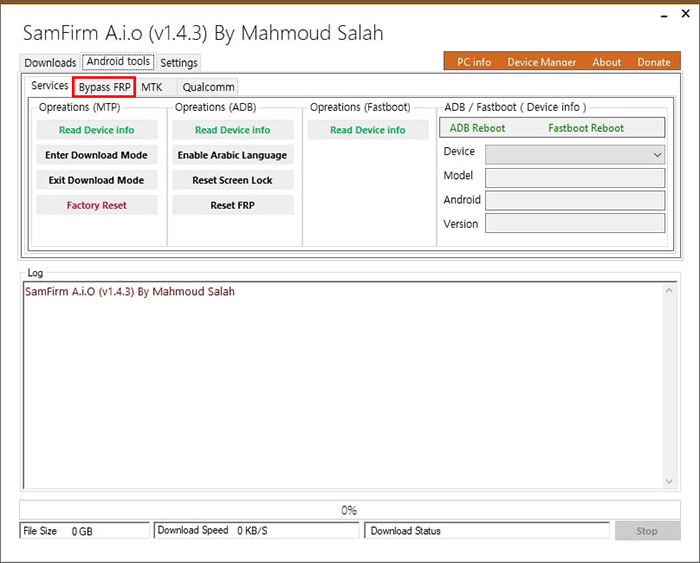
Go to the "Android Tools" tab in the SamFirm interface and select "Bypass FRP" option. Then select "Scan" > "Bypass FRP" to start the FRP removal process.
![samfirm v1.4.3 screenshot]()
Step 4. Wait for Completion
The FRP removal process may take a few minutes. When finished, your device will reboot automatically and the FRP lock will be gone.
✍️Important Notes: SamFirm FRP Tool is best for older Samsung models (Android 11 and below); it may not work for Android 12/13/14. For newer devices or those seeking an easier solution, consider alternatives like EaseUS MobiUnlock, which support newer OS versions and provide higher success rates.
3 Common Problems When Samfirm Not Working
Below are commonly reported Samfirm problems and safe, high-level remedies:
Error #1. Cannot open the Samfirm tool on Windows
Description:
Users found that the SamFirm tool fails to start or crashes when launched, especially on Windows 7, Windows 8.1, Windows 10, and Windows 11.
Solution:
- Download and install the required Microsoft .NET Framework 4.7.2 package.
- Install Visual C++ 2008 and Visual C++ 2010 Redistributable Packages (x86).
- Ensure all dependencies are present before running the tool.
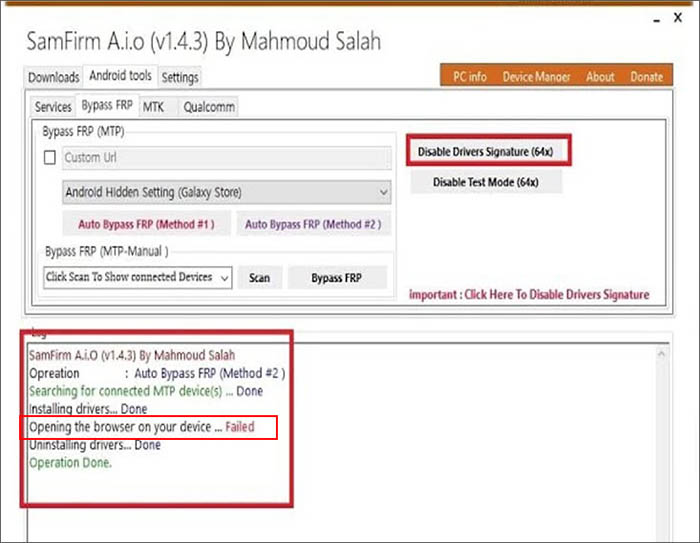
Error #2. Samfirm Opening the browser on your device... Failed
Description:
When running the FRP process in SamFirm AIO, the tool shows the Samfirm opening browser failed error message, meaning it cannot launch the browser or required helper app on the connected Samsung device.
This problem is commonly caused by a conflict or improper installation of the libusb driver on your Windows PC, which prevents the tool from communicating correctly with the device over USB.
![samfirm-opening-the-browser-failed.jpg]()
Solution 1 (The following answer is captured from XDA):
- Manually boot the OS with driver signature verification disabled (do not use SamFirm's built-in option), following instructions for your Windows version.
- Delete or rename libusb0.sys and libusb0k.dll (in System32\drivers and SysWOW64) and reboot if needed.
- Reinstall libusb drivers afresh using inf-wizard.exe from the official libusb-win32 package.
- Repeat driver setup for every new device connection to ensure stability.
Solution 1 (The following answer is extracted from YouTube):
- Press Shift + Restart buttons at the same time on your computer keyboard to enter the Safe Mode.
- On the new screen, choose Troubleshoot > Advance Options > Startup Settings to continue.
- Then click the Restart option appeared on the screen to enable Drive Signature Enforcement.
- When the computer begin to restart, long press F7 on the keyboard.
- Once the computer restarts, re-open Samfirm and start the FRP bypass process.
Error #3. Device not detected / "No device found"
Description:
SamFirm AIO does not detect the connected Samsung device (tool stays at ''no device'', or times out).
Solution:
Install official Samsung USB drivers (or the correct ADB drivers), use an original USB cable and a different USB port (preferably a rear port on desktop), run the tool as Administrator, and reboot PC/phone. If still not detected, try on another computer to isolate whether the issue is the PC or the device.
Best Samfirm Alternative
Note that Samfirm can't be always compatible for all computers running Windows 10/8/7. A lot of use encounter the "Opening the browser on your device... Failed" problem, .Net Framework messge error or Samfirm stop working issue.
If you legitimately own the device and need a supported desktop alternative tool to Samfirm, consider reputable products that provide FRP removal as a paid, supported service. For example, EaseUS MobiUnlock for Android is greatly remarkable for its Samsung FRP bypass feature.
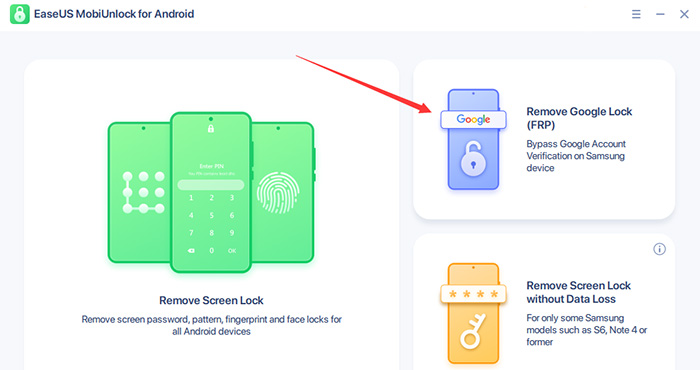
![use EaseUS MobiUnlock for Android to unlock FRP on Samsung]()
With this simple one-click FRP solution, all you need to do is connect your locked Samsung phone or tablet to a computer, launch the program, and click "Remove Google Lock (FRP)". Just follow the on-screen instructions and your Samsung Galaxy phone will be unlocked easily.
Compared to Samfirm or other community-distributed FRP bypass tools or APK files, EaseUS MobiUnlock is more secure and trustworty. With scoring 4.8 on TrustPilot, it has over 10w+ users worldwide.
For FRP bypass feature, it is avaliable for all Samsung devices unlocking. Click below to free download it safely and explore it for free.
Final disclaimer: This article is informational only. Bypassing FRP lock without authorization may be illegal and can permanently damage devices. Always follow lawful procedures and obtain permission before attempting any unlock or repair.








 NEW
NEW HOT
HOT
