FRP lock on the Samsung Galaxy A16 safeguards your device by requiring the original Google account credentials after a factory reset, preventing unauthorized access on lost or stolen phones. Launched with Android 14 and upgradable to Android 16, the A16’s robust security features make FRP removal a common challenge for legitimate owners facing forgotten credentials or second-hand purchases. This guide explores safe methods to regain access to your A16.
Bypass FRP on Samsung A16 with a Computer
EaseUS MobiUnlock for Android is a professional PC-based tool designed to remove FRP locks on Samsung devices, along with various screen locks. No advanced technical skills or test points required. It supports one-click removal for both old and new Samsung models running Android 6-15.
EaseUS MobiUnlock will guide you on how to enter the Download mode in detail and automatically flash compatible firmware to bypass FRP while aiming to preserve data where possible. Beyond FRP Bypass, it also supports removing PINs, passwords, and patterns from Samsung, Moto, LG, etc.
Why Choose EaseUS Samsung FRP Bypass Tool:
- Process FRP removal in simple clicks, with no need for a Google account.
- High success rate on almost all Samsung models, including Samsung A15/16.
- Offer 24/7 tech support and safe downloads, no ads, no registration, and no malware.
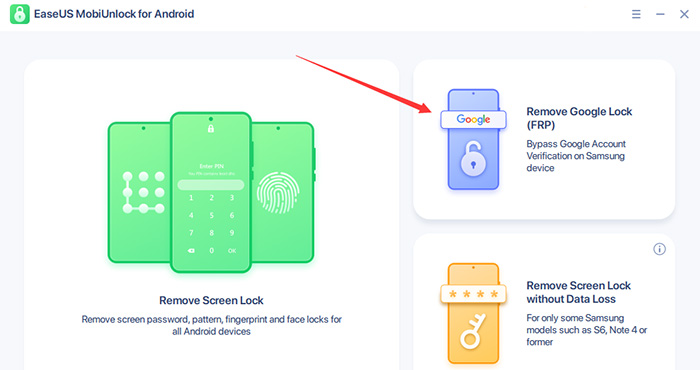
Step 1. Launch EaseUS MobiUnlock for Android on Windows, select Remove Google Lock (FRP).
![easeus mobiunlock homepage]()
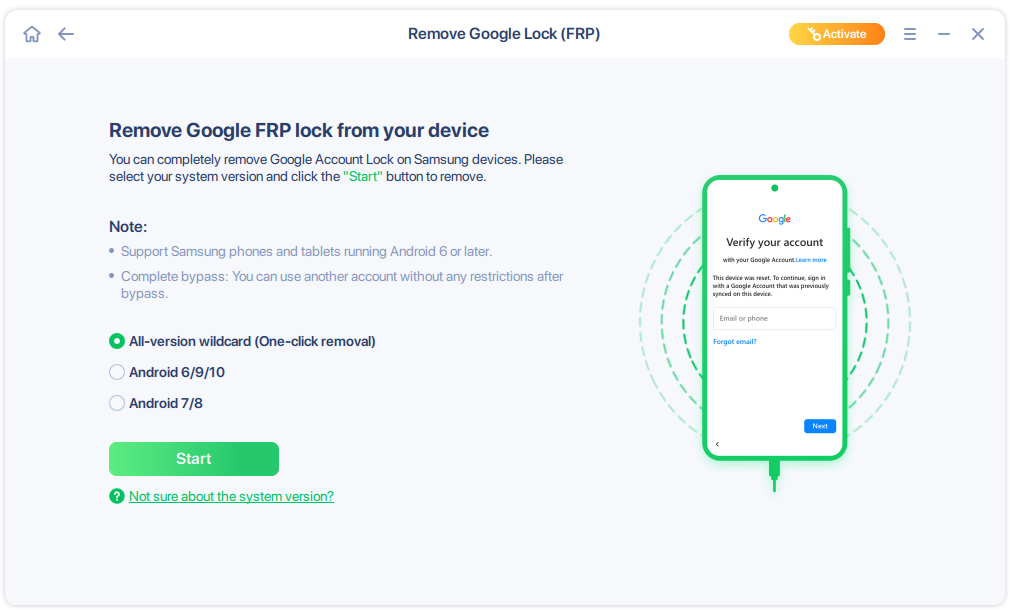
Step 2. Connect your Android device via USB and click Start and follow the on-screen instructions.
![select Sart to bypass FRP now]()
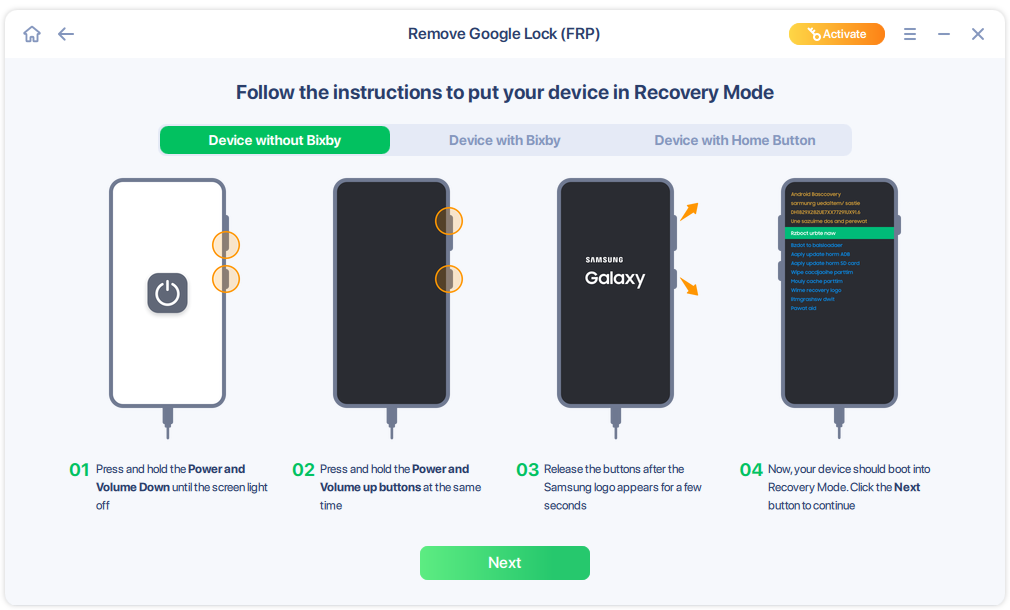
Step 3. Put your Android into Recovery Mode as prompt and wait 3–5 minutes for the FRP lock to be removed, then reboot.
![enter the recovery mode]()
Samsung A16 FRP Bypass Without a Computer
TalkBack Activation Method
The TalkBack Activation Method is a reliable no-PC FRP bypass for Samsung Galaxy A16 on Android 14/15, leveraging accessibility features to access settings and skip Google verification.
Step 1. Start the A16 after reset, connect to Wi-Fi on setup, and reach the Google verification screen; tap back to the welcome screen if needed.
Step 2. Tap the screen with two fingers simultaneously until TalkBack activates (voice feedback confirms it's on).
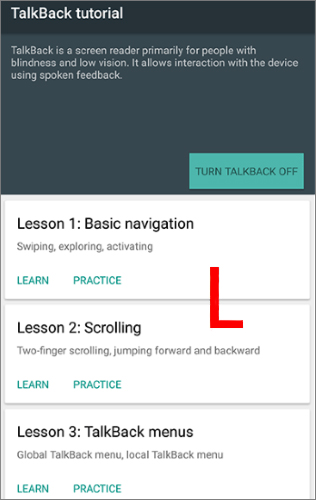
Step 3. Draw an "L" shape on the screen with one finger to open the TalkBack menu, then double-tap "TalkBack Settings" (navigate with volume keys).
![talkback-draw-l.jpg]()
Step 4. In TalkBack Settings, scroll to "Help & Feedback," double-tap a link to launch YouTube or Galaxy Store, then search for an FRP bypass APK from a trusted source and download/install it.
Step 5. Open the APK to reset Google services or network settings, return to the setup wizard, skip verification, and complete as a new device.
Step 6. After setup, go to Settings > Accounts to remove the old Google account; disable TalkBack via accessibility menu and reboot.
Emergency Dialer Method
Step 1. Connect to Wi-Fi during initial setup, reach Google verification, then tap back to emergency call and dial a code like #0# or 911370105#0*# to access the service menu or settings.
Step 2. From settings or notifications, enable accessibility/TalkBack, use volume gestures to explore, open YouTube/Galaxy Store via search, download an FRP bypass APK (e.g., from trusted sources), and install it.
Step 3. Run the APK to reset Google services or network settings, return to setup, skip verification, and complete as a new device—reboot if prompted.
Recommended Next Step
If this is your own A16 and you are locked out, the most reliable and safe path is: recover the Google account if possible, then, if still locked, use proof of purchase and reach out to Samsung support or a Samsung service center for an official FRP removal.
Conclusion
Bypassing FRP on the Samsung A16, whether with or without a PC, offers a viable path for legitimate owners locked out after a reset, but success depends on your specific model, Android version, and security patch level.
Always start with ethical recovery: reclaim your Google account via official tools, leverage purchase proof for Samsung assistance, and limit bypasses to owned devices to sidestep Knox flags, warranty loss, or legal risks.
FAQs
Why does the TalkBack method fail on my A16?
Patched security updates block accessibility exploits; try PC methods or verify your binary level (e.g., Bit 3 needs specific tools).
Will FRP bypass void my A16 warranty?
Unofficial methods may trip Knox, voiding warranty and disabling Samsung Pay/Secure Folder; official Google recovery or Samsung service avoids this.
How to avoid FRP lock before resetting A16?
Remove Google accounts from Settings > Accounts, disable screen lock, or add recovery email/phone beforehand.





 NEW
NEW HOT
HOT
