This article is for educational purposes only. Use these tools solely for recovering personally owned devices, adhering to local laws on security bypasses to avoid unauthorised access risks. Always retain proof of ownership, such as purchase receipts, and consult the device manufacturer or carrier first for official recovery options to ensure compliance. Misuse can result in permanent device bricking or account suspensions from Google services.
What is the FRP Bypass Tool by Mohammed Ali?
The FRP Bypass Tool by Mohammed Ali is a free Windows-based utility developed by a tech enthusiast named Mohammed Ali for removing Google FRP locks on Android devices, especially Samsung models.
Key Functions
It uses MTP (Media Transfer Protocol) and ADB modes to install apps like Alliance Shield X, access hidden settings, and reset FRP without rooting, ideal for older Android 5-12 phones.
Supported Devices
It primarily supports Samsung Galaxy devices running Android 5 to 12, with the best success rate on models from Android 5.0 to 10.
It runs smoothly on Windows 7, 8, 8.1, 10, and 11. However, it requires Microsoft .NET Framework 4.7.2 or later installed beforehand, plus USB drivers for your Android device.
A Little Reminder:
Newer Windows versions, such as Windows 10/11, come with the Microsoft .NET Framework 4.7.2 or later versions, such as 4.8. You can check whether your computer has installed the framework by opening the Control Panel > Programs > Programs and Features. Scroll through the list of installed programs to find entries like "Microsoft .NET Framework 4.7.2" or "Microsoft .NET Framework 4.8".
How to Use FRP Bypass Tool by Mohammed Ali
The FRP bypass tool by Mohammed Ali v1.6 removes Google FRP locks on Android devices via a Windows-based process using MTP and ADB modes. There is no official site to download the software, but you can free download the latest version from the BypassFRPFiles website. Always scan files with antivirus software post-download to mitigate malware risks common in unofficial tech tool distributions.
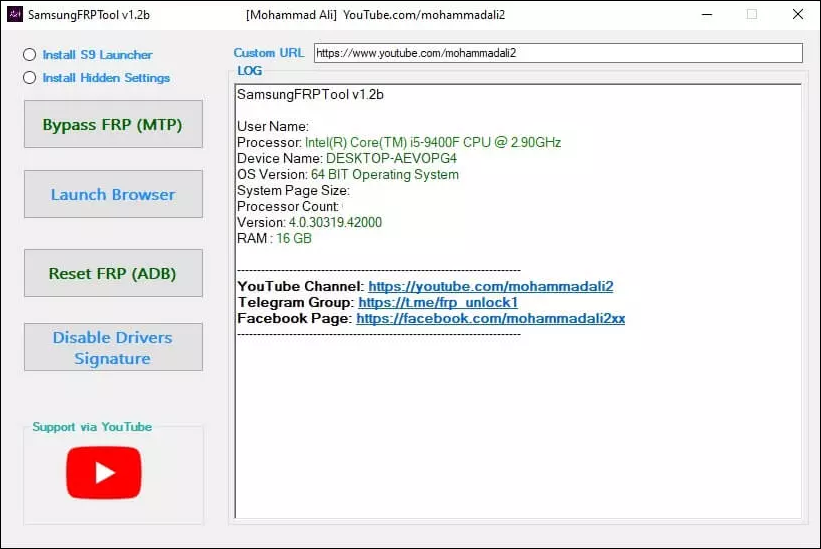
Step 1. Download and install the SamsungFRPTool on your computer. Extract the zip file and launch it as administrator.
Step 2. Connect your phone to your computer via a compatible USB cable.
Step 3. Click "Install Alliance Shield X App", then select "Bypass FRP (MTP)".
![frp-bypass-tool-by-mohammed.png]()
Step 4. On the phone, tap "View" > "Agree" to access Galaxy Store, download/install Alliance Shield X, and enable Knox/Admin during setup.
Step 5. In Alliance Shield X, go to App Manager > search "Service Mode" > Activities > "Service mode" (under IMEI/MEID) > "Open" > select "MTP + ADB."
Step 6. Reconnect to PC, choose "Reset FRP (ADB)" and wait for "Bypassed Google FRP Lock Successfully."
Step 7. Reboot the device to finish setup without Google verification.
Limitations
- Best for Samsung on Android 6-12
- Limited support for newer versions (13+)
- No official site
- Risky if downloaded from untrusted sources—always scan files.
Common Errors Reported by Actual Users:
| Errors |
Fixes |
| Failed to install drivers |
Install Samsung USB drivers manually; Restart the PC; Try different USB ports/cables. |
|
No app found to open URL
|
Reinstall the tool's launcher. |
| Phone dialer not opening |
Enable "View" or "Emergency Call" to access the Galaxy Store first for Alliance Shield X. |
| Searching for SAMSUNG USB Modem... No Port found! |
Disable driver signature; Test on another PC; Switch USB modes on the phone. |
Alternative to FRP Bypass Tool by Mohammed Ali
EaseUS MobiUnlock for Android stands out as a reliable, professional alternative to the FRP Bypass Tool by Mohammed Ali, SamsungFRPTool. It offers a one-click FRP bypass process for Samsung devices across Android 6 to 15 with high success rates. Beyond FRP removal on Samsung phones and tablets, it can also unlock the screen on 99% of Android brands, including Huawei, LG, and Motorola.
For legal recovery of owned devices, EaseUS provides a safer, more consistent option over free tools.
| Feature |
Mohammed Ali |
EaseUS MobiUnlock |
| Cost |
Free |
Paid (with trial) |
| Android Support |
Up to 12 (spotty on 13+ |
6-15 |
| Success Rate |
Variable |
High, guided |
| PC Required |
Yes, Windows-only |
Yes, available on both Windows and macOS |
| Support |
None |
24/7 professional |
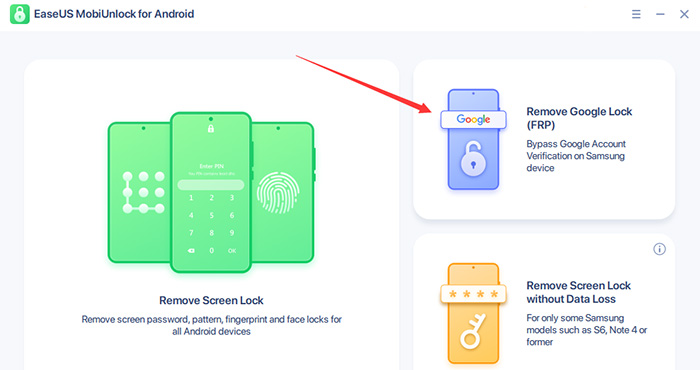
Step 1. Launch EaseUS MobiUnlock for Android on Windows, select Remove Google Lock (FRP).
![easeus mobiunlock homepage]()
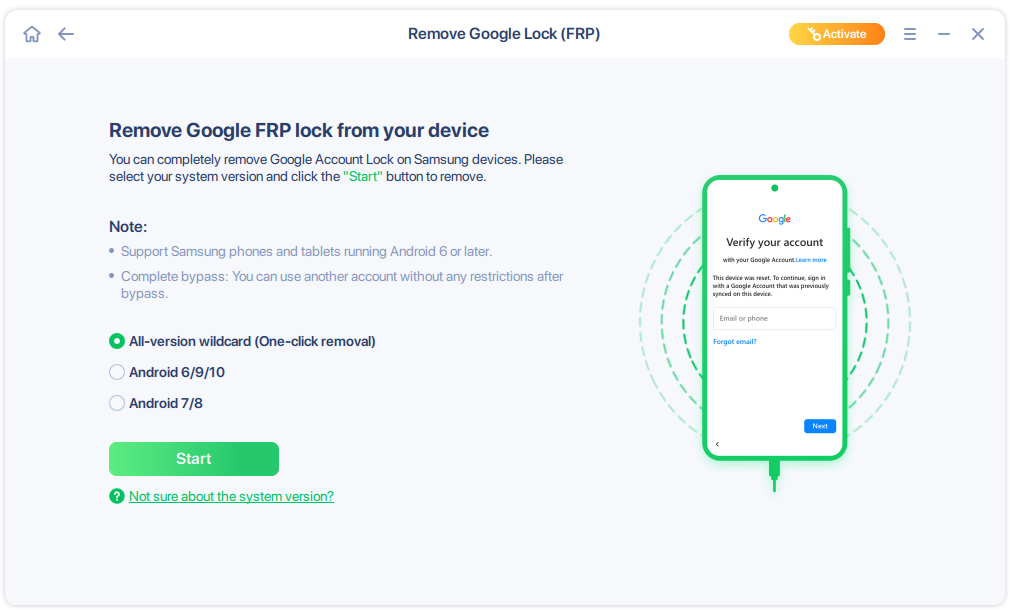
Step 2. Connect your Android device via USB and click Start and follow the on-screen instructions.
![select Sart to bypass FRP now]()
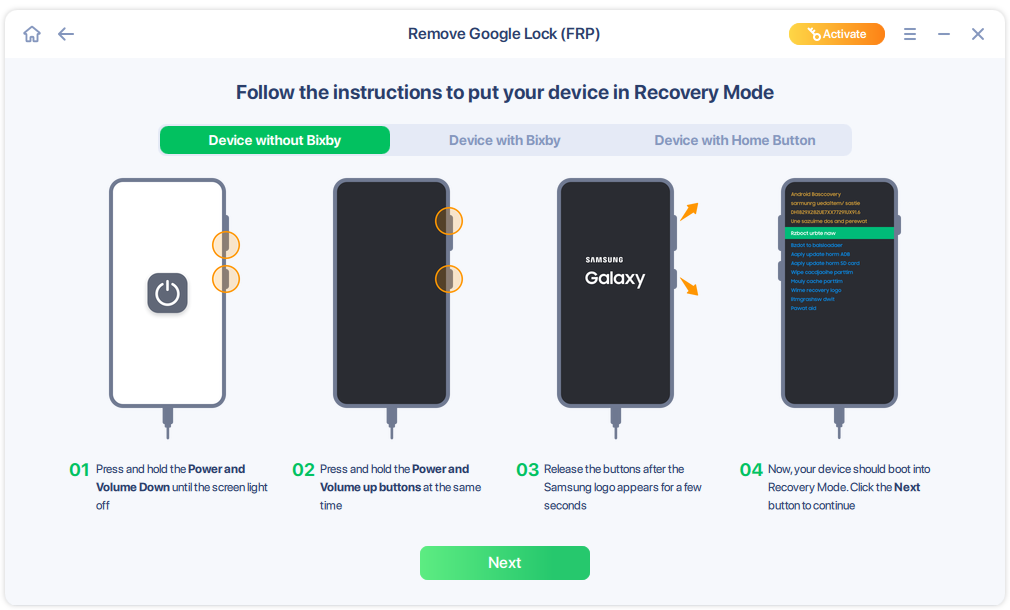
Step 3. Put your Android into Recovery Mode as prompt and wait 3–5 minutes for the FRP lock to be removed, then reboot.
![enter the recovery mode]()
Conclusion
In summary, the FRP Bypass Tool by Mohammed Ali (latest V1.6) offers a free, accessible solution for removing Google FRP locks on Android 5-12 devices, particularly Samsung models, via straightforward MTP/ADB steps, though occasional driver or connectivity errors may occur.
For Android 13-15 or hassle-free results, opt for EaseUS MobiUnlock, which provides superior compatibility and support.
FAQs
Is the FRP Bypass Tool by Mohammed safe and legal to use?
Safe from trusted sources with antivirus checks; legal only for recovering your own devices. Avoid unauthorised access.
What if the tool freezes during MTP bypass?
Close and relaunch as administrator, ensure no antivirus interference, and verify phone battery is above 50% before retrying.
How long does the full process typically take?
About 10-20 minutes, depending on device model and USB stability—faster on Samsung A-series than flagships.
What happens if I interrupt the ADB reset process?
Reconnect and restart from the MTP bypass step—avoid force reboots to prevent incomplete lock removal.





 NEW
NEW HOT
HOT
