What Is MotoReaper FRP Tool?
MotoReaper FRP Tool is used to bypass the Factory Reset Protection lock, especially on Motorola smartphones. It provides a streamlined one-click solution to unlock Motorola FRP, making it particularly user-friendly for technicians, repair shops, and end users who need to regain access to their devices after a reset.
Supported Devices
- Moto G series (Moto G4, G5, G6, G22, etc.)
- Moto E series
- Moto Z series (such as Moto Z Play)
- Motorola One series
- Motorola Droid Turbo 2
- Moto X series
This Motorola FRP Bypass tool also works on Qualcomm and MediaTek chipsets. For its compatible versions, it was primarily developed by the PhonLab team and tested for devices running from Android 5 to Android 7.
| Latest Version |
V5.0.2 |
| File Type |
exe |
| File Size |
41.9MB |
| Compatibility |
Windows XP/7/8/8.1/10/11 |
| Last Update |
2017 |
| Official Website |
No |
| Success Rate |
Higher success rate on older phone models, uncertain for new models or Android versions |
How to Use MotoReaper to Bypass Motorola FRP Lock
Where to Download
As mentioned above, MotoReaper does not have an official website, so users should download it from third-party websites, which may contain malware and advertisements. There are some downloading sites collected online:
- Android File Host (This page displays many ads, potentially leading to unsafe clicks.)
- Bypass FRP Files (The download link redirects you to mediafire.com, which also has pop-up ads and risks of fake downloads.)
Both sites are unofficial; thus, they contain a genuine risk of downloading malware, cracked, or modified versions of MotoReaper that could harm your device or PC. Therefore, users should ensure to scan all downloaded files with antivirus software before executing them. Moreover, it is advisable to rely on reputable sources or trusted Android unlocking forums that provide community feedback on download safety.
How to Use
The following steps are provided for legitimate use only. Users can only perform unlocking actions on their own devices or devices for which they have explicit permission to unlock.
Step 1. Download and unzip the MotoReaper on your Windows computer.
Step 2. Launch it, and click Let's Get Started. Then, click Install Moto USB Drivers.
Step 3. Click Next > I Agree > Close > Let's Continue.
Step 4. Now, power off your Moto phone. Connect your phone to the computer in Bootloader mode (press and hold the volume down and power keys to enter Bootloader mode).
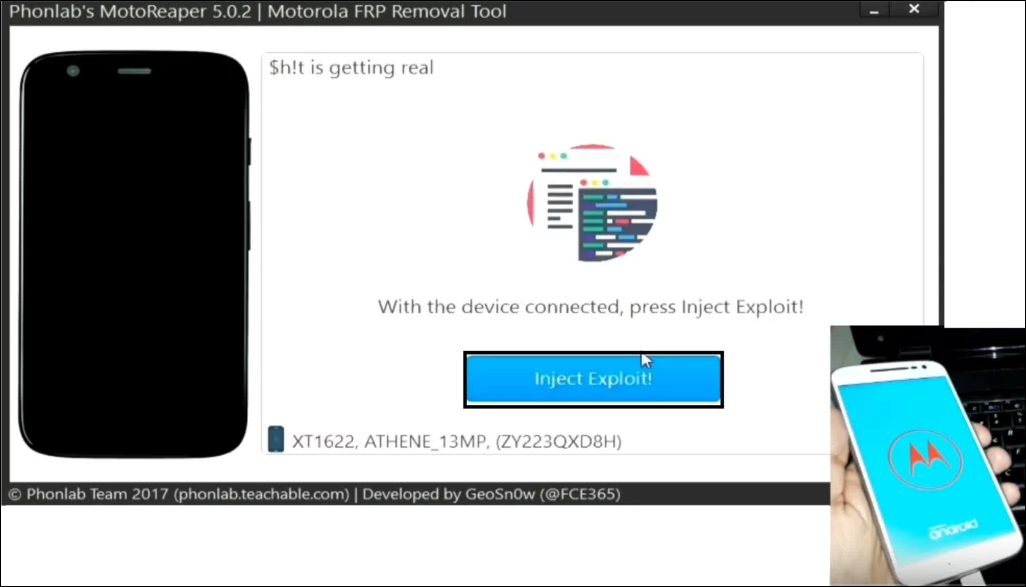
Step 5. Then, MotoReaper will detect the connected phone automatically. Click Next Stage > Injext Exploit.
Step 6. Wait for the FRP bypassing to complete, and your phone will be rebooted several times during this process.
![motoreaper-inject-exploit.png]()
Important Notes:
- Ensure your phone is sufficiently charged before starting.
- Use the original or a good-quality USB cable.
- Newer Motorola models or Android versions may require alternatives or updated tools.
| Pros |
Cons |
- A simple interface makes it accessible for both beginners and technicians.
- The process does not require rooting the device, reducing the risks and complexity.
- It is a free tool available for everyone who wants to bypass FRP lock.
|
- It is not compatible with macOS. It only runs on Windows computers.
- No official site to download the tool, increasing the risks of malware, unwanted ads, or fake files.
- It does not work reliably on newer Moto phone models or Android versions.
- Lack of recent updates means new bugs and incompatibilities may affect performance or success rate.
|
How to Bypass FRP on Other Android Phones
For users looking to bypass FRP or unlock screen locks on a broader range of Android brands beyond Motorola, EaseUS MobiUnlock for Android is an excellent option to consider. This software supports unlocking various types of screen passwords, including PINs, patterns, passwords, etc. It works on many popular Android brands, such as Samsung, Moto, LG, OnePlus, OPPO, Sony, and Nokia.
Notably, EaseUS MobiUnlock for Android provides specialized support for removing FRP locks on Samsung phones running Android 6 to 13, making it a reliable choice for Samsung users facing Google account verification issues after factory resets.
Thanks to its intuitive interface and wide compatibility, EaseUS MobiUnlock is ideal for individuals who need a trusted solution to regain access to locked Android devices beyond just Motorola. It offers a seamless and effective way to bypass security locks, helping users get back full control of their smartphones quickly and safely.
How to remove FRP on Samsung without technical skills:
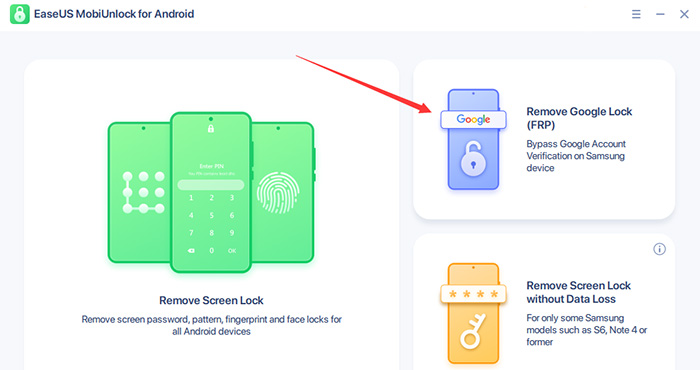
Step 1. Launch EaseUS MobiUnlock for Android on Windows, select Remove Google Lock (FRP).
![easeus mobiunlock homepage]()
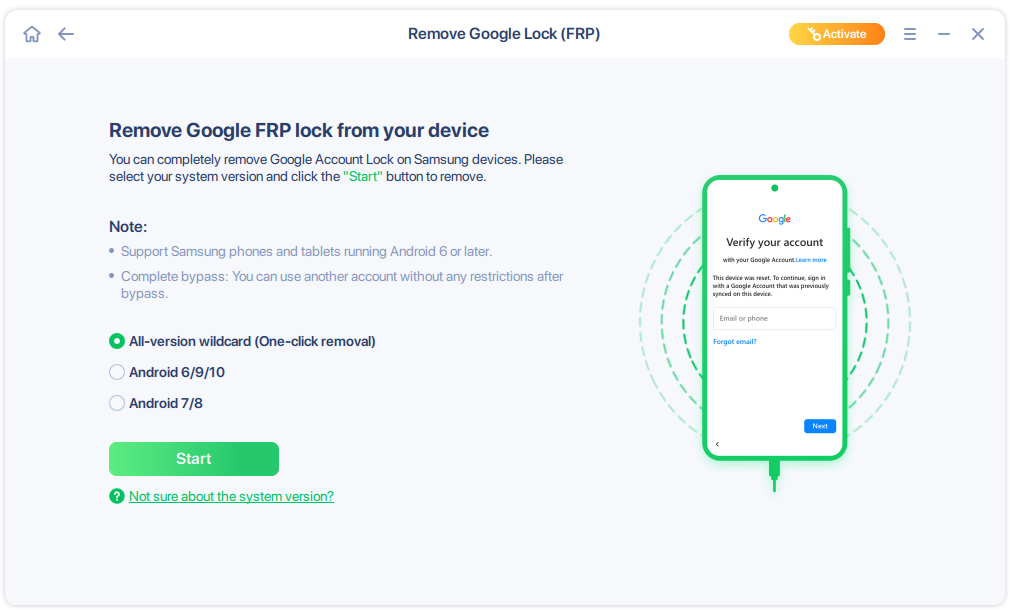
Step 2. Connect your Android device via USB and click Start and follow the on-screen instructions.
![select Sart to bypass FRP now]()
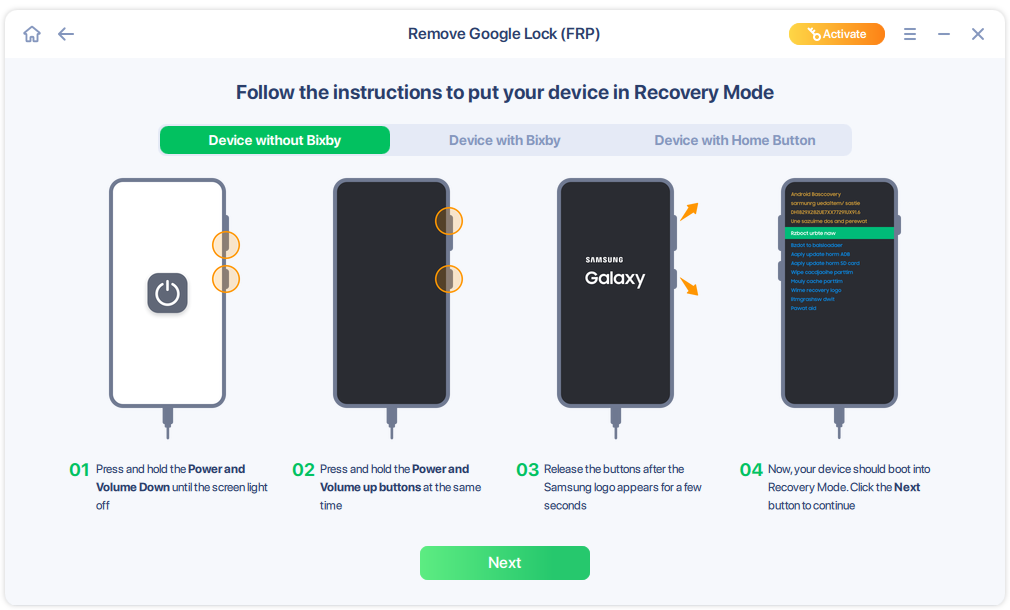
Step 3. Put your Android into Recovery Mode as prompt and wait 3–5 minutes for the FRP lock to be removed, then reboot.
![enter the recovery mode]()
Conclusion
While MotoReaper is effective for Motorola devices running older Android versions, broader solutions like EaseUS MobiUnlock for Android offer comprehensive support for many Android brands, including Samsung, with the ability to unlock screen locks and remove FRP on newer Android versions.
Choosing the right FRP bypass tool depends on your device model, brand, and Android version. Always consider the safety, compatibility, and ease of use of the tool you select. Remember to download all tools from reputable sources to avoid security risks and carefully follow the instructions to ensure a successful and safe unlocking process. With the right approach, bypassing FRP locks allows you to restore full use of your Android device.
Motorola FRP Bypass FAQs
1. Is MotoReaper safe to use?
While the tool is designed for FRP bypass, it must be downlaoded from third-party websites since there is no official site, which can pose risks. Always download from trusted sources and scan files for malware.
2. Is Motoreaper free to use?
Yes, Motoreaper is generally available for free, especially as part of PhonLab courses. However, be aware of some unofficial distributions that ask for payment or contain malware.
3. Is Motorola FRP bypass legal?
Bypassing FRP on devices you own or have explicit permission to service is generally legal. Bypassing FRP on stolen or unauthorized devices is illegal and unethical.
4. Does bypassing FRP void the phone's warranty?
Yes, FRP bypass tools and unlocking processes may void your Motorola phone warranty.
5. What precautions should I take while performing the Motorola FRP bypass?
Ensure your phone has enough battery, use original USB cables, back up important data if possible, and carefully follow instructions. Download tools from safe sources to avoid malware risks.






 NEW
NEW HOT
HOT
