☑️Quick Answer for Free FRP Bypass APK:
For older Android 5–10 devices, Easy Flashing FRP Bypass APK and VnROM APK are the most reliable options. For Android 11 and above, using a PC-based FRP tool like EaseUS MobiUnlock ensures safe and efficient Google account removal.
Before You Use Any FRP Bypass APK (Legal & Safety Notice)
Factory Reset Protection (FRP) is a security feature designed by Google to protect Android devices from unauthorized access.
FRP Google bypass methods and APKs should only be used under the following conditions:
- You are the legal owner of the device, or you have received explicit permission from the owner.
- You are trying to regain access to your own phone after forgetting the Google account password.
- The device is second-hand but legitimately purchased and proof of ownership can be provided.
- You are a technician performing recovery work for verified customers.
Do NOT use FRP bypass tools for any illegal activity, such as attempting to access stolen, lost, or unverified devices. Misusing these methods may violate local laws and Google's Terms of Service.
#1. Easy Flashing FRP Bypass 8.0 APK
Easy Flashing FRP Bypass 8.0 APK is a classic free APK method designed for older Samsung, Motorola, and LG devices running Android 5–8. It remains surprisingly reliable for older Samsung and LG phones. While it's not made for modern Android security patches, its success rate on legacy devices is better than many newer "one-click" scripts.
Its biggest advantage is its simplicity—once installed, it guides users directly to key system settings such as Google Account Manager, allowing you to remove the verification lock without any special commands.
❇️Key Features:
- Opens browser directly from FRP screen
- Provides Settings shortcut
- Lightweight APK
- No PC required
Pros: The APK is extremely small, loads quickly even on slow devices, and usually works without requiring a SIM card or OTG cable, which is convenient for field technicians.
Cons: On newer Android versions (Android 10+), it becomes hit-or-miss due to updated Google security patches, and the UI feels outdated compared to newer tools.
Best For: Best for users who want a lightweight, beginner-friendly FRP APK that works well on older Samsung and LG devices. If you're handling 2015–2019 Android models, this tool is still one of the most reliable APK bypass options. For Android 12+, you'll need a PC-based FRP tool instead.
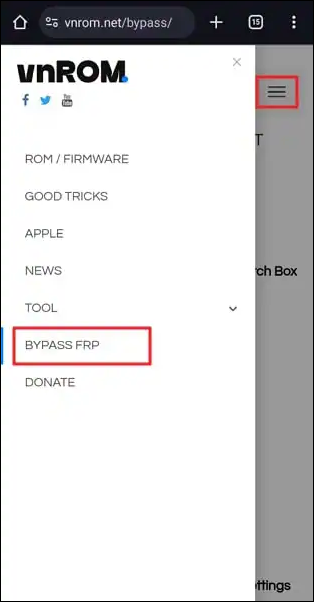
#2. VnROM FRP Bypass APK
VnROM FRP Bypass APK is one of the most widely circulated free FRP APK tools online, mainly because it still works on a broad range of devices from Samsung, Xiaomi, Tecno, Infinix, and older Huawei models. It leverages classic browser-based loopholes to open Settings or launch Google Account Manager, making it a dependable option for devices running Android 6–10. While it cannot bypass newer Android 12+ security patches, it remains one of the easiest ways to break past the "Verify your account" screen on mid-range and budget phones.
![vnrom bypass frp]()
Its appeal comes from its simplicity: once launched, it creates a direct path into essential device menus—often through browser redirects—allowing users to remove or replace the previously synced Google account without advanced steps.
❇️Key Features:
- Browser login exploit
- Direct shortcut to Settings
- Supports many budget Android brands
- Does not require a PC
Pros: VnROM is known for its broad compatibility and extremely simple workflow. Even on low-end devices, it runs smoothly, and most technicians appreciate that it doesn't require OTG accessories or special permissions.
Cons: Because it's so popular, the web is full of fake or modified downloads, which means users must be careful about sourcing the APK from a trusted firmware site. Its effectiveness also weakens significantly on Android 11 and higher.
Best For: Best for users working with common budget Android devices—especially Samsung A/J series and Xiaomi Redmi phones—with Android 6–10. If you want a no-PC, no-complexity workflow, this APK is still one of the most recognizable and effective options.
#3. Pangu FRP Bypass APK
Pangu FRP Bypass APK is an older but still respected free tool that originally gained traction for how quickly it could open Settings and Google Account Manager on Samsung and Huawei devices. It remains useful for older Android builds, especially Android 5–8, where newer APKs often fail due to outdated compatibility. While it no longer competes with modern PC tools in terms of reliability, Pangu is valued for how fast it works once it launches—many bypasses take only a few minutes.
Its workflow focuses on giving users immediate access to system menus, allowing for manual account removal or re-adding a new Google account.
❇️Key Features:
- Fast-loading UI
- Direct Settings access
- Supports older Samsung & Huawei
- Small file size
Pros: Pangu remains one of the fastest APK-only FRP tools, with a very direct and straightforward process that technicians appreciate when dealing with older or slower devices.
Cons: Its effectiveness drops sharply on Android 10+, and the tool is rarely updated. Users with newer devices will almost certainly need a PC-based bypass tool.
Best For: Best for older Samsung and Huawei models stuck on Android 5–8. If you're handling older, low-storage, or slow devices, Pangu delivers one of the quickest FRP Google bypass workflows.
#4. FixFirmware APK
FixFirmware APK comes from a firmware-focused community known for providing clean, versioned Android repair files. That means the APK tends to be more reliable than random tools circulating online. It mainly helps users open hidden menus, keyboard settings, and app info screens—entry points commonly used in classic FRP bypass workflows for Android 6–10 devices. While it may not be the flashiest tool, its stability and predictable behavior make it a favorite among technicians who frequently download stock ROMs and flash tools.
A key reason users trust it is the reputation of its source platform, which frequently updates Android patches and maintains a clean file catalog.
❇️Key Features:
- Enters Settings through multiple shortcuts
- Clean, verified firmware-site source
- Stable performance on Android 6–10
- No PC required
Pros: Reliable file integrity and consistent behavior make this APK a safe choice for technicians who need predictable results without worrying about modified or ad-injected files.
Cons: It's not as mainstream as VnROM or RootJunky, so there are fewer user guides, fewer YouTube tutorials, and limited troubleshooting discussions online.
Best For: Best for users who want a clean, stable APK sourced from a trusted firmware site. If you frequently download ROMs or rely on structured firmware libraries, FixFirmware's APK fits naturally into your workflow.
#5. RootJunky APK
RootJunky FRP Bypass APK is one of the most trusted tools in the Android repair community, backed by a well-known technician with years of credibility. The APK focuses on browser-based login bypasses and provides quick access to Google Account Manager, helping users remove or change the Google account linked to the device. It's especially valuable because countless guides, videos, and community threads reference it, making troubleshooting far easier than with most APK-based tools.
Although newer Android security patches limit APK-only methods, RootJunky remains a go-to solution for Android 6–10 devices due to its reliability and trustworthy file source.
❇️Key Features:
- Browser sign-in bypass
- Fast Settings access
- Highly documented in communities
- Trusted, clean source
Pros: Users benefit from transparency, community trust, and abundant tutorials that walk through every step of the process—ideal for beginners who need guidance.
Cons: The APK is not updated frequently, and its success rate drops significantly on Android 11+, where most APK-based exploits are patched.
Best For: Best for users who want a community-trusted, beginner-friendly FRP APK with plentiful tutorials and support resources. It shines on Android 6–10 Samsung, Motorola, and Nexus devices.
#6. MaxRoms APK
MaxRoms FRP Bypass APK comes from another firmware-oriented site, which means users can generally expect clean files and versioned downloads. The tool focuses on opening hidden settings pages, app info panels, and system menus—classic navigation tricks used to remove or re-add the Google account. It's not meant to replace PC tools, but rather to act as a helper method for technicians handling older or mid-range Android devices.
While MaxRoms is less popular than VnROM or RootJunky, many firmware enthusiasts appreciate its stability and clean source.
❇️Key Features:
- Settings and app-info shortcut launcher
- Works well on Android 6–10
- Sourced from a trusted firmware site
- Lightweight installation
Pros: Its predictable behavior and clean file origins make it ideal for technicians who already rely on MaxRoms for ROMs, patches, and repair files.
Cons: Its UI is extremely basic, and its success rate can vary depending on the device brand and patch level. Newer Android builds are mostly unsupported.
Best For: Best for users who regularly work with Android 6–10 devices and prefer APKs sourced from structured firmware repositories. For anything newer, pairing it with a PC-based FRP tool is strongly recommended.
Trusted Sites to Download FRP File APK (Safe Sources)
If you're looking for additional FRP bypass APKs—such as Google Account Manager packages, Settings launchers, QuickShortcutMaker variants, or browser-based bypass tools—several firmware-oriented websites collect these files in one place. These sites are popular among technicians because they often host multiple APK versions needed for older Samsung, Motorola, Xiaomi, Tecno, and LG devices.
Here are some of the most reliable sources:
- frpbypass.download
- frpbypass.cc
- FixFirmware FRP
Bonus Part: FRP Bypass with PC (More Reliable & Effective)
While APK-based methods are useful for older Android devices, most modern phones running Android 11, 12, 13, and 14 have patched the majority of APK exploits. On these newer builds, the FRP screen blocks browser launches and prevents sideload—making APK-only methods almost impossible. Also, many FRP Google bypass APKs come from third-party sources and carry risks such as malware or adware, data theft, or permanent device damage.
For higher security and success rates, especially on newer Android versions, consider using trusted PC-based FRP unlock tools instead of installing unknown APKs.
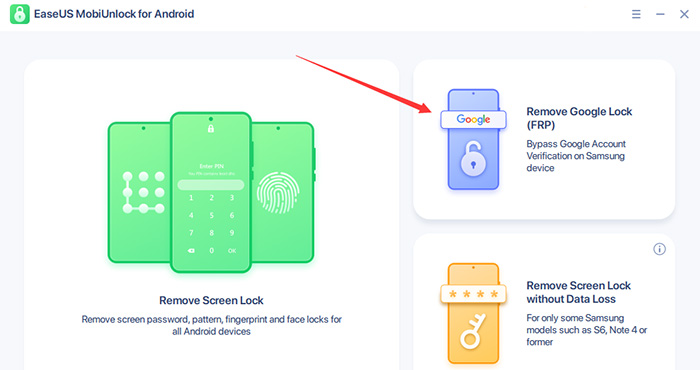
One of the most versatile options is EaseUS MobiUnlock, which exclusively supports Samsung FRP bypass. Instead of relying on browser shortcuts, the software directly removes the FRP lock through a guided, automated process that works even when the device has no SIM card.
![easeus mobiunlock screenshot]()
❇️Why choose a PC tool over APKs?
- Works on Android 6–16, where APKs fail
- No need to sideload apps or use risky third-party APK files
- Faster and more stable than manual APK-based loopholes
- Simple steps and clean interface
For users handling modern Android phones—or those who want a clean, predictable workflow—a PC FRP bypass tool is the safest and most reliable choice.
Conclusion
FRP bypass APKs still play an important role in the Android repair world, especially for older devices running Android 5–10. Tools like Easy Flashing, VnROM, and RootJunky remain surprisingly useful when dealing with older Samsung, LG, Motorola, or low-end budget models. However, because newer Android versions have patched most APK exploits, users should download these tools only from trusted firmware sites and understand their limitations.
For Android 11 and above, a PC-based FRP solution offers dramatically higher success rates and significantly less risk. Whether you're a technician or an average user trying to regain access to your device, the safest approach is to pair APK methods for older models with a reliable desktop FRP tool when working on modern Android builds.
FAQ
1. Are FRP bypass APKs safe to use?
They are safe only when downloaded from trusted firmware websites or reputable GSM communities. Many APKs floating around the web are modified and may include ads, spyware, or injected code. Always verify the source.
2. Can FRP bypass APKs work on Android 11, 12, 13, or 14?
In most cases, no. Modern Android builds block browser access, Settings shortcuts, and sideloading from the FRP screen. For Android 11+, you typically need a PC-based FRP tool such as EaseUS MobiUnlock for Android.
3. Which APK works best for older Samsung devices?
Tools like Easy Flashing 8.0, VnROM, and RootJunky have the highest success rate on older Samsung A/J series phones (Android 5–8). They are lightweight and easy to run without a PC. These Samsung FRP bypass APKs are definately great options for older models.
4. Is using an FRP bypass APK illegal?
Not if you are unlocking your own device or assisting a legitimate owner. FRP bypass is intended for restoring access—not for bypassing security protections on stolen devices.
5. Why does "Google Account Manager" matter for FRP bypass?
Many APK methods rely on installing a specific version of Google Account Manager (GAM) that matches your Android version. This enables certain login screens or redirects that help bypass the FRP lock.







 NEW
NEW HOT
HOT
