What is vnROM Bypass?
vnROM Bypass is a third-party tool to help Android users bypass the Factory Reset Protection lock, known as FRP lock. FRP is a security feature meant to deter theft by locking the device after a reset unless the original Google account information is provided. However, users can be locked out if they forget their Google credentials. In this case, vnROM Bypass provides a free and accessible method to regain device access quickly.
Why do you need vnROM Bypass:
- Factory resetting an Android device without knowing the linked Google account.
- Users have bought second-hand Android phones locked with FRP.
- Devices get stuck on the Google verification screen after system updates or resets.
- Users seek to regain functionality when locked out due to forgotten Google passwords.
Legal Considerations:
This article is for educational purposes only. Use vnROM Bypass only on devices you own or have permission to unlock. Bypassing security locks on stolen or unauthorized devices is illegal. We are not responsible for any damage or legal issues that may result from misuse. Always download software from official sources and proceed with caution.
How Does vnROM Bypass Work?
vnROM Bypass exploits weaknesses in the Android operating system related to the FRP lock. This method uses a special app that lets you open the phone's settings or a web browser without needing to enter the Google account info first.
It takes advantage of hidden tricks in the phone to get temporary access. From there, you can add a new Google account or turn off the lock. Usually, you put this app on a USB drive or connect it with a cable, then follow the instructions on the phone to finish the process.
Devices and Android Versions Supported:
VNROM supports a wide range of Android devices from popular manufacturers, including Samsung, Huawei, Motorola, Xiaomi, Oppo, and others. It works on many Android versions, from Android 5 to Android 15.
However, compatibility can vary by device model and Android security patch level, with newer devices sometimes requiring updated versions of vnROM or supplementary tools for successful bypass. There are a few examples of specific compatibility:
- The tool supports a wide range of Samsung Galaxy devices, particularly the S, A, and M series.
- It works on many Xiaomi and Redmi models, but compatibility can be more limited.
- Its reliability may decrease with newer software, such as Android 14 and 15, depending on the device and security patches.
vnROM Bypass Step Guide
What you should prepare:
- Ensure your device model and Android version are supported by the latest VNROM bypass tool.
- Back up your data beforehand. VNROM bypass usually doesn't erase data, but it's best to be safe.
- Make sure your device has at least 50% battery to avoid interruptions.
- Ensure your locked phone is connected to a stable internet.
- You need a USB drive and an OTG cable.
How to Use vnROM Bypass:
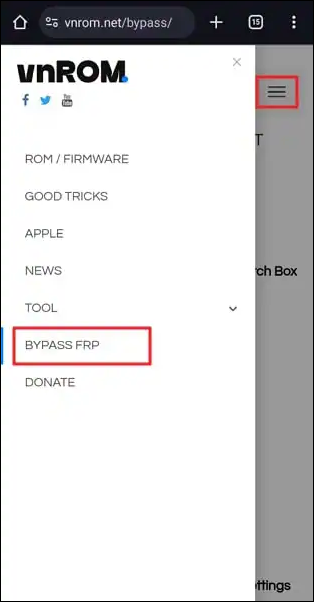
Step 1. On another device, visit the official vnROM website, choose Bypass FRP, and select the vnROM Bypass APK suitable for your device. Download and save the file to a USB drive.
![vnrom-bypass-frp.png]()
Step 2. Use an OTG cable to connect the USB drive with the vnROM APK file to your locked phone.
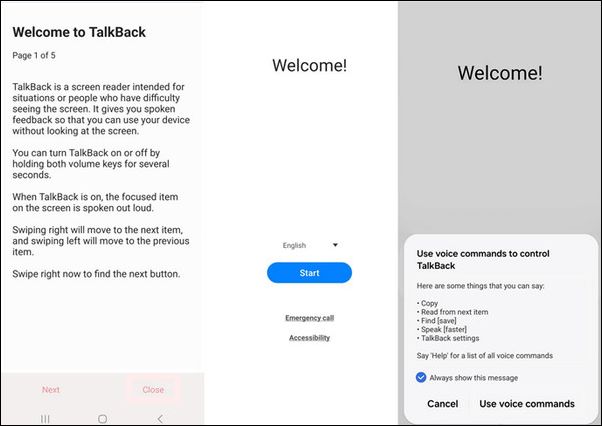
Step 3. On the phone, triple-tap the Home Button to activate TalkBack, which will then open a special menu.
Step 4. Select TalkBack Settings from the menu, and triple-tap the Home Button again to open the Help & Feedback menu.
Step 5. Tap Get Started with Voice Access, then play the YouTube video that appears.
![vnrom-talkback.png]()
Step 6. While the video plays, tap Get Started with Voice, then tap the user profile icon at the top right.
Step 7. Open Terms and Privacy Policy, then tap Cancel.
Step 8. Hold the Bookmarks tab, go to Download History, then tap My Files.
Step 9. Find and install the vnROM APK file from your USB drive. If asked, enable installation from unknown sources in the phone's settings.
Step 10. After installation, go to Settings > General Management > Reset > Factory Data Reset. Confirm and reset the device.
Step 11. When the phone restarts, set it up without the Google account verification step.
Pros & Cons of vnROM Bypass
| Advantages |
Limitations/Risks |
- Free to use with no license fees.
- Wide compatibility with many Android brands.
- Doesn't usually erase your data during the bypass.
- It can work without a computer.
- Frequently updated to improve device compatibility.
|
- Not effective on the latest Android versions.
- Requires hardware like a USB drive and an OTG cable.
- No official customer support or user guides.
- Some devices may not be supported, and success is not guaranteed.
- The process carries a risk of rendering the device unusable/bricking.
|
Best Alternative to vnROM Bypass for Samsung
If you are looking for a reliable and easy Samsung FRP bypass tool, EaseUS MobiUnlock for Android can work as an alternative to vnROM. EaseUS MobiUnlock for Android is a professional tool that can unlock various types of locks, including screen locks and FRP.
How it compares to vnROM:
While vnROM works well on many devices, EaseUS MobiUnlock for Android is a more user-friendly, straightforward, and professional tool for bypassing FRP and screen locks on Android. It is ideal for users who want a supported software solution with step-by-step guidance via PC connection.
Why choose EaseUS MobiUnlock for Android:
- Supports unlocking screen locks on any Android phone.
- One-click to bypass Samsung FRP lock without technical skills.
- User-friendly with a clear software interface and instructions.
- Offers 24/7 professional support and a 30-day money-back guarantee.
How to unlock Samsung FRP:
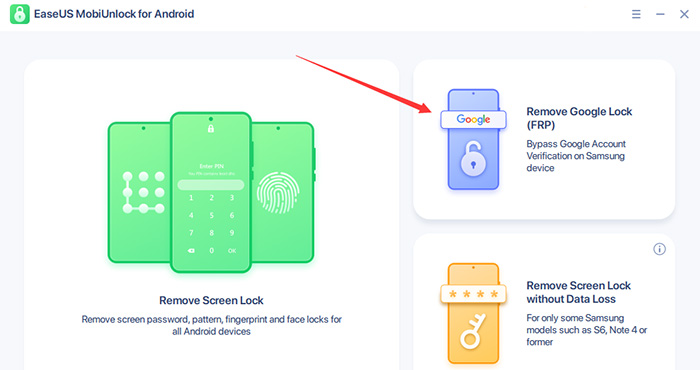
Step 1. Launch EaseUS MobiUnlock for Android on Windows, select Remove Google Lock (FRP).
![easeus mobiunlock homepage]()
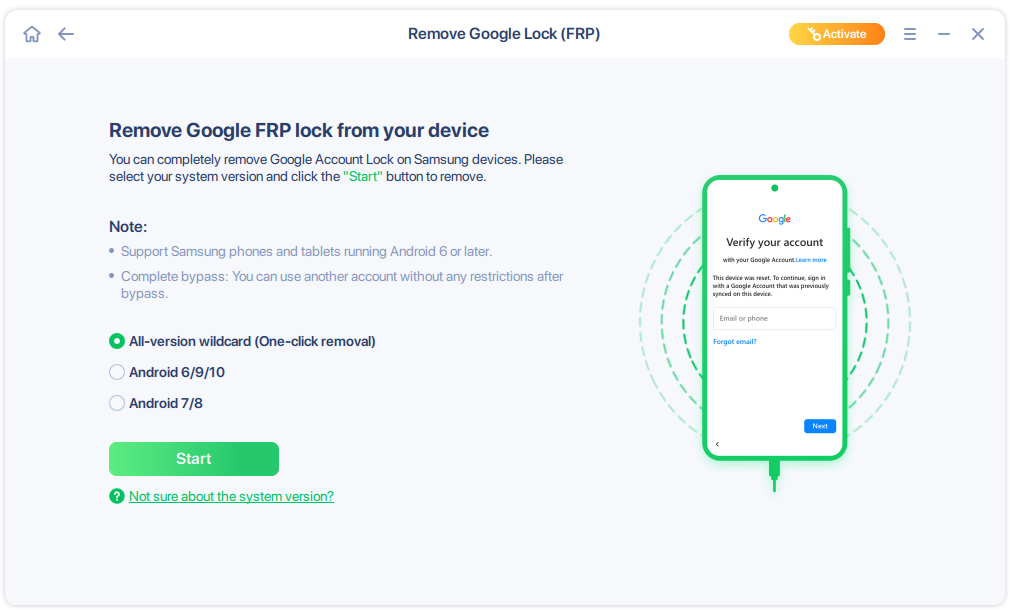
Step 2. Connect your Android device via USB and click Start and follow the on-screen instructions.
![select Sart to bypass FRP now]()
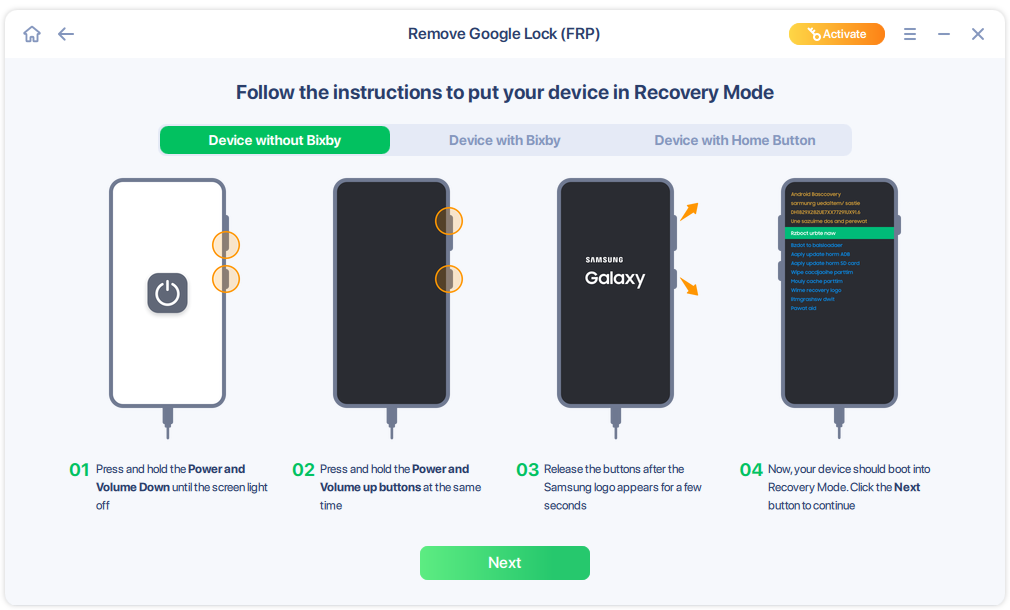
Step 3. Put your Android into Recovery Mode as prompt and wait 3–5 minutes for the FRP lock to be removed, then reboot.
![enter the recovery mode]()
Conclusion
vnROM Bypass is a free tool designed to bypass Google's FRP on various Android devices, particularly those from Samsung, Motorola, and other major brands. Its APK method provides a convenient solution for users who are locked out of their devices due to forgotten Google credentials or the purchase of a second-hand phone.
However, vnROM may not work effectively on the latest Android versions. Users should also be cautious about security risks and device compatibility before using the tool. For newer devices or those with stricter security patches, alternative professional solutions, such as EaseUS MobiUnlock for Android, offer a more robust and reliable bypass experience.
FAQs
1. Do I need a PC to use vnROM Bypass?
A computer is not essential. VNROM APK can be installed directly on the locked device using a USB drive and OTG cable, though PC usage is required for some advanced steps.
2. Is vnROM Bypass safe to use?
vnROM is generally safe if downloaded from its official site. However, downloading APKs from untrusted sources can expose your device to security risks.
3. Will vnROM Bypass erase my device data?
Usually, vnROM does not erase data during bypass, but it is always recommended to back up your data beforehand if possible.
4. Does vnROM Bypass remove the old Google account permanently?
vnROM bypass helps you access the device, but it may not completely remove the old Google account from the device permanently.
5. Is using vnROM Bypass legal?
Bypassing FRP on a device you own is generally legal, but using it on stolen or unauthorized devices is illegal.







 NEW
NEW HOT
HOT
