What Is the TFT Unlock Tool?
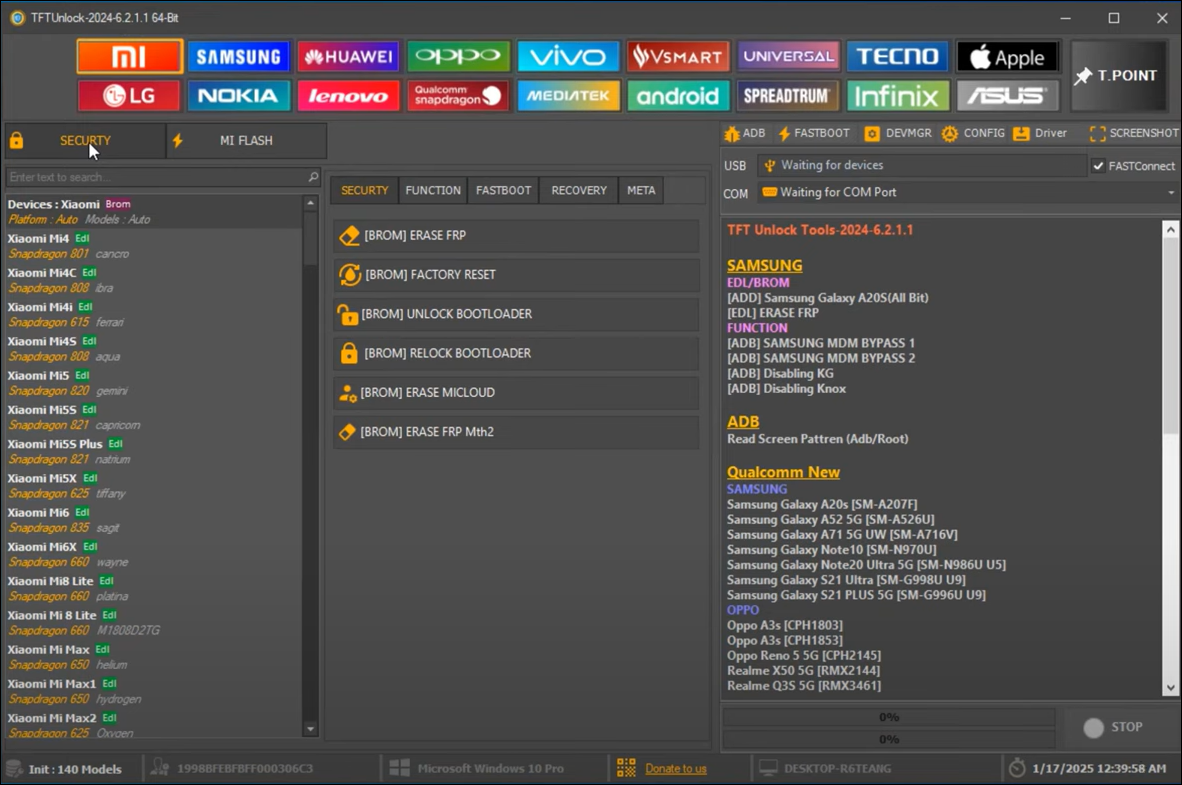
TFT Unlock Tool is a powerful and easy-to-use software for Windows that helps fix various issues on Android phones. It can remove screen locks, bypass Google FRP, unlock bootloaders, repair damaged or missing IMEI numbers, and flash firmware to restore or update the device. Thus, it can be a handy all-in-one toolkit for mobile technicians and advanced users who need to unlock or repair Android smartphones quickly.
It supports many Android phones and tablets, including Samsung, Xiaomi, OPPO, Vivo, Huawei, Tecno, Infinix, and others. The tool was updated in early 2025 to work with new phone models, and the latest version is v6.2.1.1.
Key Features of TFT Unlock Tool:
- Remove FRP lock without needing the original credentials.
- Unlock forgotten screen locks, including patterns and passwords.
- Repair or rewrite IMEI numbers for better network functionality.
- Unlock or relock the bootloader for customization and rooting.
- Flash stock firmware or custom ROMs to fix software issues.
![tft-unlock-tool.png]()
Is TFT Unlock Tool Safe? Risks & Pros Explained
The safety of the TFT Unlock Tool largely depends on where you download it from and how it is used. Although the TFT Unlock Tool offers strong utility and features, it should be used with caution. Here are some risks and benefits that you can refer to before actually using the tool.
Understand the potential risks that the tool itself carries or that it may bring to your devices.
| Software Risks |
Device Risks |
- It may contain malware or malicious code if downloaded from untrusted sites.
- It may require disabling antivirus software during installation, exposing your computer to security risks.
- The tool may damage the device if the connection is unstable or the process is interrupted.
|
- Improper use can lead to data loss, device bricking, an unresponsive phone, or voiding the phone's warranty.
- Attempting to unlock on newer or highly secure devices may fail or cause permanent harm.
|
If you are looking for a better tool:
Considering all the risks associated with the TFT Unlock Tool, EaseUS MobiUnlock for Android offers a more reliable method for removing screen locks and FRP. It ensures a higher success rate and your data privacy. Download from the official site without any ads or malware.
Decide to use it or not based on the advantages and shortcomings.
| Pros |
Cons |
- Unlock bootloaders and flash custom firmware to customize or fix devices.
- Regain access to locked phones due to forgotten passwords or second-hand purchases.
- Download the software setup file and install it on your PC without an initial cost.
- The tool is updated to support new devices and Android versions.
|
- Not beginner-friendly; requires some technical knowledge to use safely and effectively.
- Setup and operation can be complex and time-consuming.
- Limited official documentation and customer support.
- Requires Windows 7 or later and at least 4GB of RAM to run; not available on Mac.
- Purchase the full version to unlock advanced features.
|
The tool should only be used on devices you own or have explicit permission to unlock or repair. Unlocking phones and bypassing security features may be subject to regional regulations. Always consult local laws and policies before using unlocking software like TFT Unlock Tool.
How to Free Download & Use the TFT Unlock Tool
TFT Unlock Tool is a powerful Android servicing utility mainly designed for professionals. Improper use may lead to data loss, device damage, or voiding device warranties. Always back up your data before using the tool. Download and use only from official or trusted sources to avoid malware risks. Using this tool to unlock devices without proper ownership or authorization is illegal and unethical.
Where to Download:
- https://freesoftcr.com/tft-unlock-tool-free-download/
- https://tfttool.com/ (The most obvious download button may be for ads, not the TFT unlock tool.)
📢Note Regarding Safety:
Both sites redirect you to another website and generate a download link instead of a direct file download to your PC. Therefore, you need to copy and paste the link into your browser again to download the TFT unlock tool.
This download method may expose your system to malware and potentially unwanted programs. It does not guarantee the file is clean. For professional use, a safe alternative like EaseUS MobiUnlock for Android with proper support (24/7 tech support) is strongly recommended.
Step-by-Step Guide on How to Use TFT Unlock Tool
Step 1. Install the Tool
- Right-click the downloaded file and select "Extract All" to unzip the contents.
- Run the extracted executable file as an administrator.
- Accept the license agreement when prompted.
- Enter the setup password as specified by the download source.
- Follow the on-screen instructions to complete the installation.
Step 2. Activate and Connect Device
- Enable VPN if required by the tool to access its server.
- Launch the TFT Unlock Tool and log in; some versions require an account or license activation.
- Connect your Android device via USB. Use Boot Key or EDL mode if necessary.
- Select your device brand and model from the software interface.
Step 3. Perform Unlock or Repair
- Choose the desired operation, such as FRP bypass, screen lock removal, IMEI repair, or firmware flashing.
- Follow the on-screen instructions to enable USB debugging or authorize the PC on your device.
- Click "Start" or "Bypass" and wait for the tool to complete the process.
Step 4. Finalize and Safely Disconnect
- After the operation, reboot the device and disconnect it safely.
TFT Unlock Tool vs Alternatives: Which One Should You Choose?
TFT Unlock Tool offers many functions, but carries risks when downloaded unofficially and requires some technical skill. EaseUS MobiUnlock for Android provides a safer, beginner-friendly, and officially supported solution for Android devices, focusing on simple screen unlock and FRP bypass. It provides better user guidance, technical support, and reduced risks of data loss.
| Aspects |
TFT Unlock Tool |
EaseUS MobiUnlock for Android |
| Supported Devices |
Mainly Android (Samsung, Xiaomi, Oppo, Huawei, etc.) |
Works on 99% Android phones, including Samsung, Huawei, LG, Xiaomi, etc. |
| Functions |
FRP bypass, screen lock removal, bootloader unlock, IMEI repair, firmware flashing |
Screen lock removal, FRP bypass |
| Interface |
More technical, suited for technicians and advanced users |
User-friendly, designed for all skill levels |
| Installation |
PC-based tool; requires disabling antivirus sometimes |
PC-based, safer install without disabling antivirus |
| Price |
Free versions available; official full access may require payment or VPN subscription |
Paid software with a free trial; requires a license for full use |
| Data Safety |
Risk of data loss if not used carefully |
Keep data intact on certain phone models |
| Updates/Support |
Regular updates; limited official support in cracked versions |
Regular updates with 24/7 technical support |
| Ease of Use |
Technical knowledge recommended |
Very easy to use, step-by-step guided process |
Overall, EaseUS MobiUnlock for Android is a safer choice when unlocking your phone. Check the step guide below to unlock your Samsung's FRP lock.
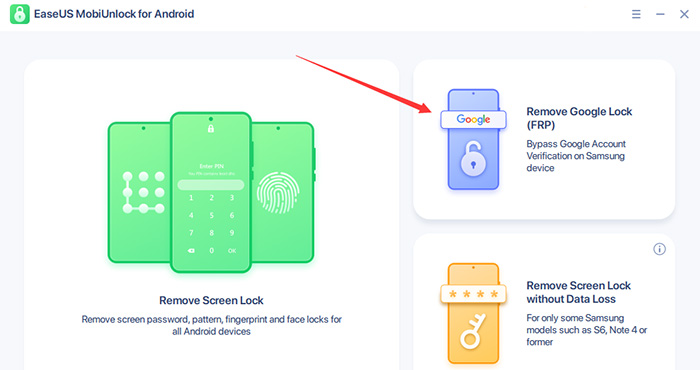
Step 1. Launch EaseUS MobiUnlock for Android on Windows, select Remove Google Lock (FRP).
![easeus mobiunlock homepage]()
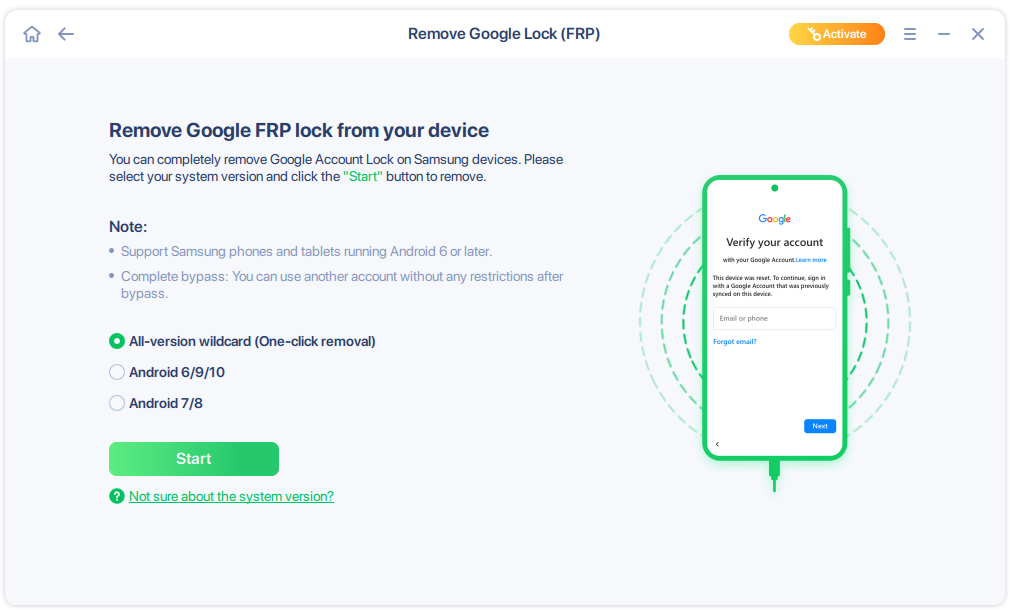
Step 2. Connect your Android device via USB and click Start and follow the on-screen instructions.
![select Sart to bypass FRP now]()
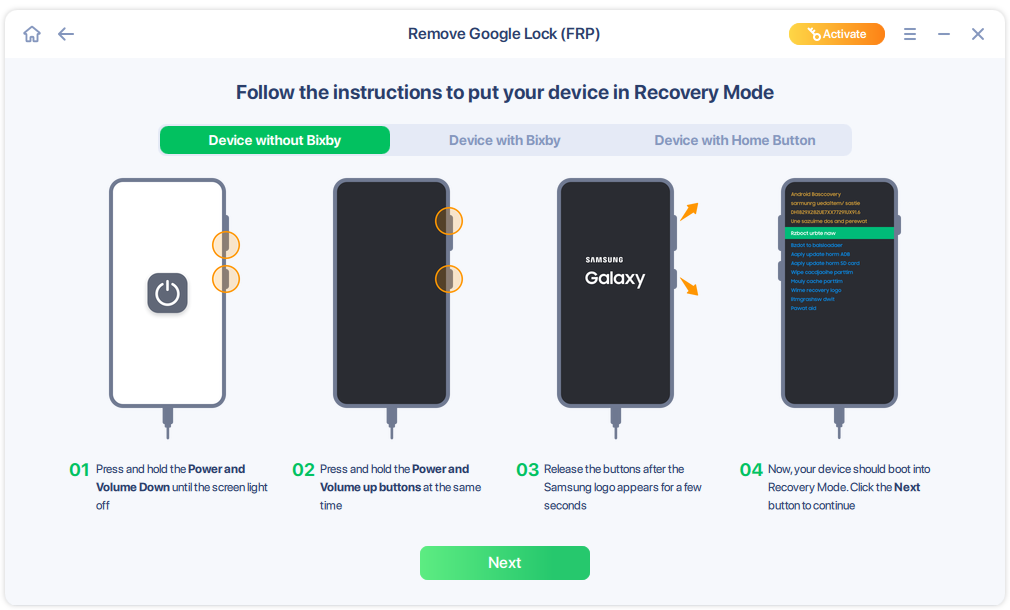
Step 3. Put your Android into Recovery Mode as prompt and wait 3–5 minutes for the FRP lock to be removed, then reboot.
![enter the recovery mode]()
Conclusion
TFT Unlock Tool stands out as a comprehensive Android unlocking and servicing solution favored by mobile technicians and advanced users due to its broad device compatibility, multi-functionality, and frequent updates. While it offers a powerful feature, users must approach it with caution, given its technical complexity, potential security risks, and legal considerations. Proper use involves downloading from trusted sources, backing up data, and respecting local laws. For novices or those seeking higher safety and official support, alternatives like EaseUS MobiUnlock may be preferable.
Frequently Asked Questions About TFT Unlock Tool
Does TFT Unlock Tool work on all Android phones?
It supports a wide range of Android brands and models, but compatibility may vary with some newer or highly secured devices.
Is TFT Unlock Tool free?
Free versions and cracked releases exist, but official full features may require purchase or VPN activation.
Does using TFT Unlock Tool erase data on my phone?
Some operations, such as screen lock removal, may preserve data, but flashing firmware or performing a factory reset will erase it. Back up important data beforehand.
Is it safe to disable antivirus software during installation?
Disabling antivirus software increases risks; only do it temporarily if necessary and ensure you download the tool from trusted sources.
Can TFT Unlock Tool be used without a PC?
No, it is a PC-based tool requiring Windows to run.
Is unlocking with TFT Unlock Tool legal?
It is legal to unlock devices you own or have permission to service, but unauthorized unlocking of stolen devices or bypassing security illegally is prohibited.





 NEW
NEW HOT
HOT
