This article provides an information overview of TFM Tool Pro based on publicly available sources; it does not constitute software endorsement or professional advice. Using repair tools carries risks including data loss, device bricking, or voided warranties. Always back up data, verify model support, and consult qualified technicians.
What Is the TFM Tool Pro?
TFM Tool Pro is professional Windows-based software for mobile technicians to repair, unlock, and service Android devices across multiple brands and chipsets like MediaTek, Qualcomm, and Spreadtrum. Its main functions include firmware flashing, factory reset, FRP bypass, network unlocks, bootloader unlocks, and diagnostics.
![tfm-official-page.png]()
Supported OS Versions:
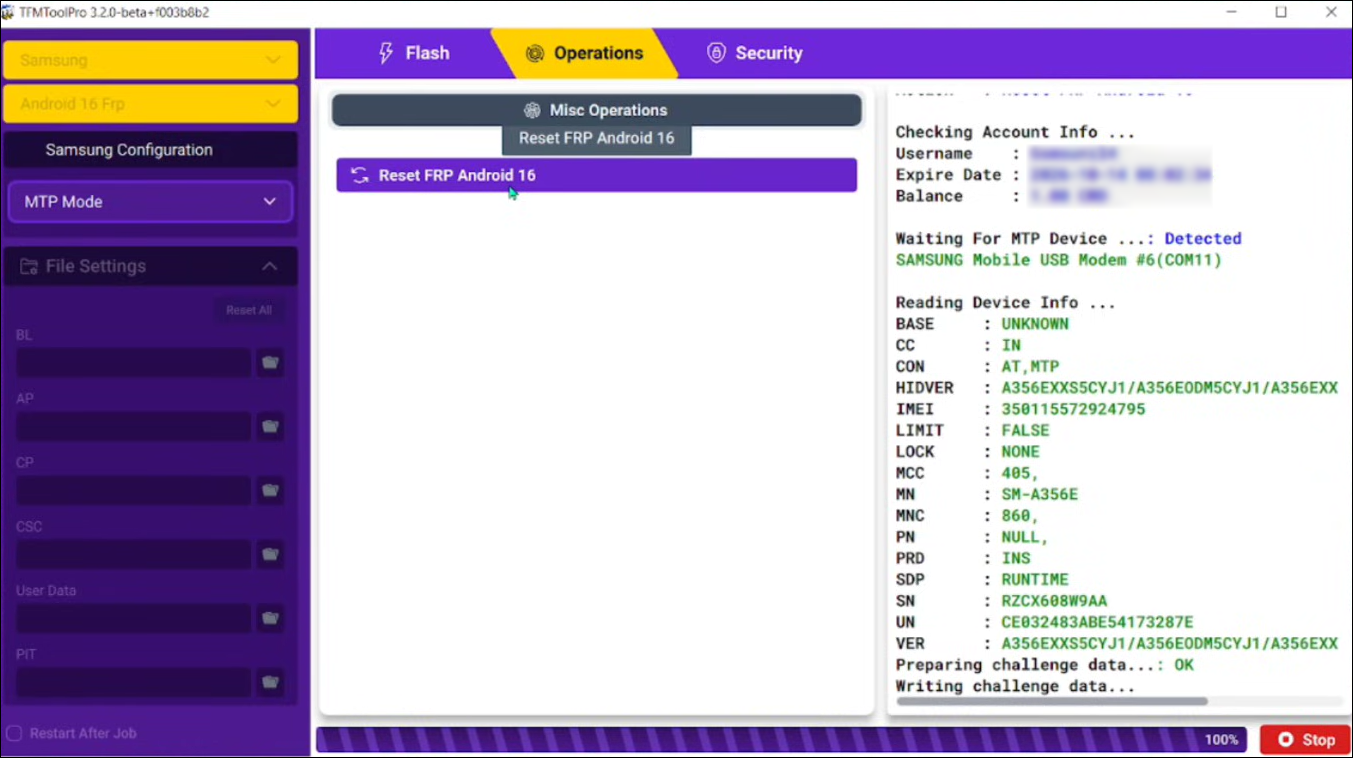
- Android OS: It supports Android devices running from Android 9 to Android 15. The recent updates added Samsung FRP bypass for Android 16 and fixed the SPD anti-crack issue. Therefore, it supports devices up to Android 16, the latest Android version.
- Compatibility: It is for Windows only, available for Windows 8, Windows 10, 32/64 bit.
Supported Android Model:
- Samsung: the Samsung Galaxy series.
- Xiaomi/Redmi: Note 4/6/7/9, MI 5s/6/8 series, A2/A2 Lite, Max 2/3.
- OPPO/Realme: A1/A5s/A12/A15/A31/A55/A73/A92s, Reno 2F/3/3 Pro/10/11, F9/F11/F17, Narzo 10/50 series, etc.
- Vivo/iQOO: Y20/Y20s/Y31/Y35/Y50, S1/S5/S7, U1/U10, Nex series, iQOO 3/Neo/Pro.
- Tecno/Infinix/Itel: Hot 10i/11/12/30i/40, Smart 6/7/8, Note 30i, Pova Neo, S23/S23+.
- Others: Huawei, Nokia, Motorola, Lenovo, ZTE, HTC, Lava IRIS, Wiko Lenny/View series, QMobile.
TFM Tool Pro Price:
TFM Tool Pro is not a free tool. You need to purchase a paid license to activate features.
- 3 months for 20 CRD
- 1 year for 30 CRD
- 2 years for 50 CRD
TFM Tool Pro 3.2.0: Detailed Step Guide for FRP Bypass
The latest TFM Tool Pro is v3.2.0, released on December 5th, 2025, supporting FRP bypass, firmware flashing, resets, unlocks, and more on Android devices with MTK, Qualcomm, and SPD chipsets up to Android 16.
Note: Back up your device data first.
Step 1. Download the latest TFM Tool Pro ZIP file from the official site. Extract it, and run Setup.exe as administrator on Windows.
Step 2. Install promoted USB drivers (MTK, Qualcomm, SPD) for proper device detection.
Step 3. Launch the tool, create or log in with your account. Verify email if new.
Step 4. Go to emegsm.net and connect to the reseller. (The official site also offers ways to contact the reseller.) There, you have to purchase the activation key with the email you just registered.
Step 5. Connect the locked Android phone via a USB cable. Select FRP Reset in the tool and wait for the process to complete.
![tfm-tool-pro-reset-frp.png]()
Is TFM Tool Pro Safe? [Pros & Cons Explained]
TFM Tool Pro is generally safe when downloaded from the official site or trusted resellers, as it prioritizes secure processes and regular updates to protect device data during repairs like FRP bypass and flashing. However, operations like resets or unlocks carry standard risks of data loss or bricking if misused.
TFM Tool Pro offers strong capabilities for Android repairs but comes with notable limitations typical of professional servicing tools.
| Pros |
Cons |
- User-friendly interface requires no advanced technical skills for operations.
- Multifunctional support across brands like Samsung, Xiaomi, and Tecno.
- Frequent module updates for new models/OS versions.
|
- Paid-only with no free trial or short-term options.
- No Mac support, and occasional errors like 0xc0000142.
|
Best Alternative to TFM Tool Pro for FRP Bypass
EaseUS MobiUnlock for Android stands out as a reliable option for users seeking FRP bypass without technical depth. This Windows and Mac-compatible software focuses on straightforward screen lock and FRP removal.
It supports Samsung, LG, Motorola, and other Android brands up to recent versions. Just using a USB connection, you can factory reset your phone without passwords and remove the FRP lock without Google credentials.
Unlike TFM Tool Pro, which requires a more complex setup process, including compatible USB drivers, verifying compatible chipsets, and buying a license from resellers, EaseUS MobiUnlock provides a streamlined, beginner-friendly experience and a direct subscription model from our official site. Moreover, the 24/7 online chat allows you to communicate with the technical team before/during/after purchase.
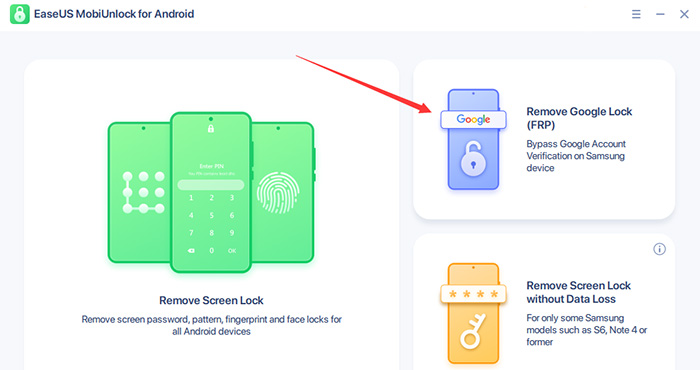
Step 1. Launch EaseUS MobiUnlock for Android on Windows, select Remove Google Lock (FRP).
![easeus mobiunlock homepage]()
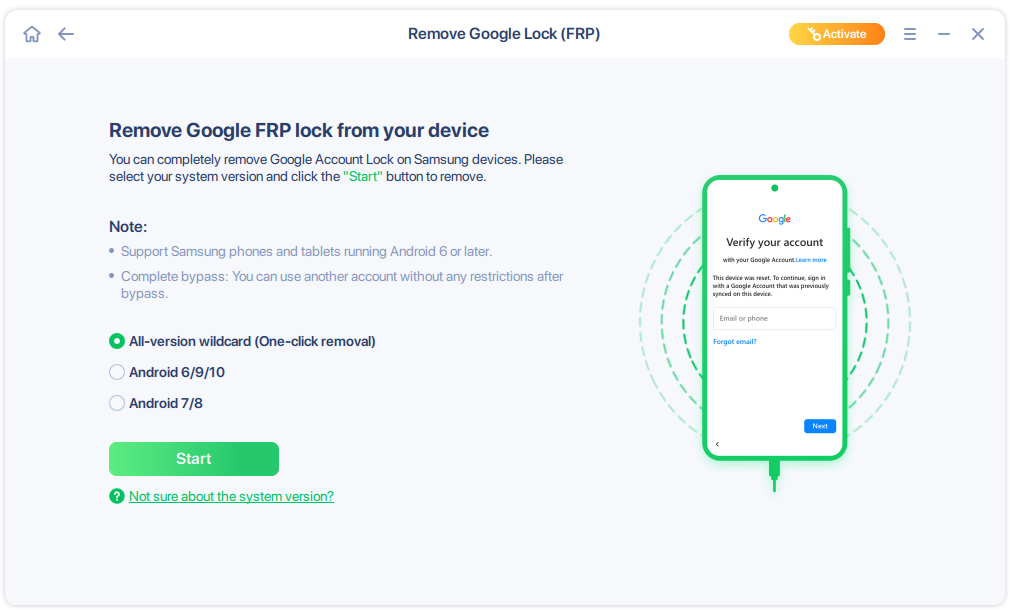
Step 2. Connect your Android device via USB and click Start and follow the on-screen instructions.
![select Sart to bypass FRP now]()
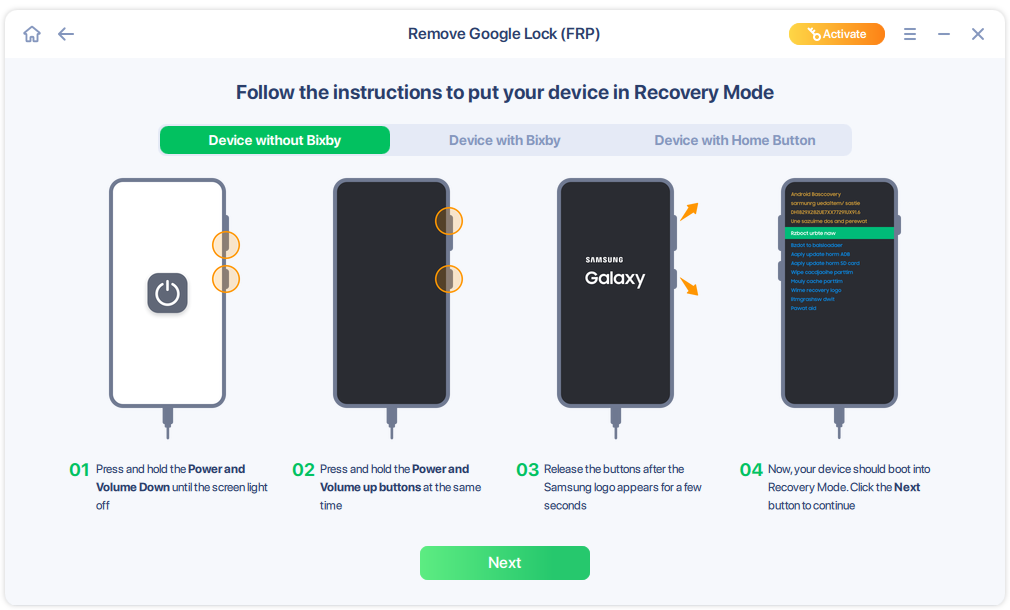
Step 3. Put your Android into Recovery Mode as prompt and wait 3–5 minutes for the FRP lock to be removed, then reboot.
![enter the recovery mode]()
Conclusion
TFM Tool Pro stands as a powerful, professional solution for Android repairs like FRP bypass, firmware flashing, etc. Though it's paid software with a Windows-only setup, it supports multiple Android versions and brands, making it suitable for technicians.
For those who want quick, easy access to their locked Android phone due to forgotten screen passwords or Google credentials, EaseUS MobiUnlock for Android offers an intuitive alternative that works with major brands without any hassles.
FAQs
Can the TFM Tool Pro work offline after activation?
Initial activation and updates require an internet connection, but most operations like FRP bypass and flashing run offline once licensed and modules are loaded.
Does TFM Tool Pro require rooting the device?
No rooting needed for core functions like FRP reset or factory reset. It uses direct chipset access, making it suitable for stock devices.
What are the common error codes in TFM Tool Pro and their fixes?
Errors like 0x0000142 often stem from missing drivers or admin rights. When you encounter this issue, try reinstalling drivers, running the software as admin, or restarting.
What should I do if the TFM Tool Pro fails to detect my device?
Check USB cable quality, try different ports, reinstall chipset-specific drivers, and restart the tool as admin.
What's the difference between TFM Tool Pro modules (MTK/QC/SPD)?
MTK for MediaTek (Xiaomi/Realme), QC for Snapdragon (Samsung), SPD for Unisoc (Tecno/Infinix)—each has tailored functions like Auth FRP or IMEI null repair.







 NEW
NEW HOT
HOT
